Overview
If your program has year-round applications, there is a chance some families will need to be manually moved from one application year into the next one. This article will teach you how to move waitlisted families between application years.
Written Steps
Step 1: Login as an Admin
- Sign into Hubbe with the Agency Admin Role
- Alternatively, login with the Intake and Eligibility Coordinator role
Step 2: Navigate to the Applications and Waitlist Grid
- From your home page, click the menu item titled Intake, Eligibility, and Enrollment and the submenu titled Applications and Waitlist
- From this page click on the blue Filters text option at the top of the page
- Make sure the filter labeled Application Year is set to the current/previous fiscal year
- Click on the blue Apply filters button
Step 3: Move Any Applications to the Next Year
- From our waitlist, we can review and see any possible applications that we may want to move from the previous fiscal year, to the current fiscal year
- If an application is abandoned, and the family is no longer interested you may also archive this application by clicking on the Status and then clicking the Archive option
- If an application is abandoned, and the family is no longer interested you may also archive this application by clicking on the Status and then clicking the Archive option
- For an application we want to carry over to the current year, we will click on the checkbox icon next to the application to highlight the row. Repeat this for as many applications as you would like to move.
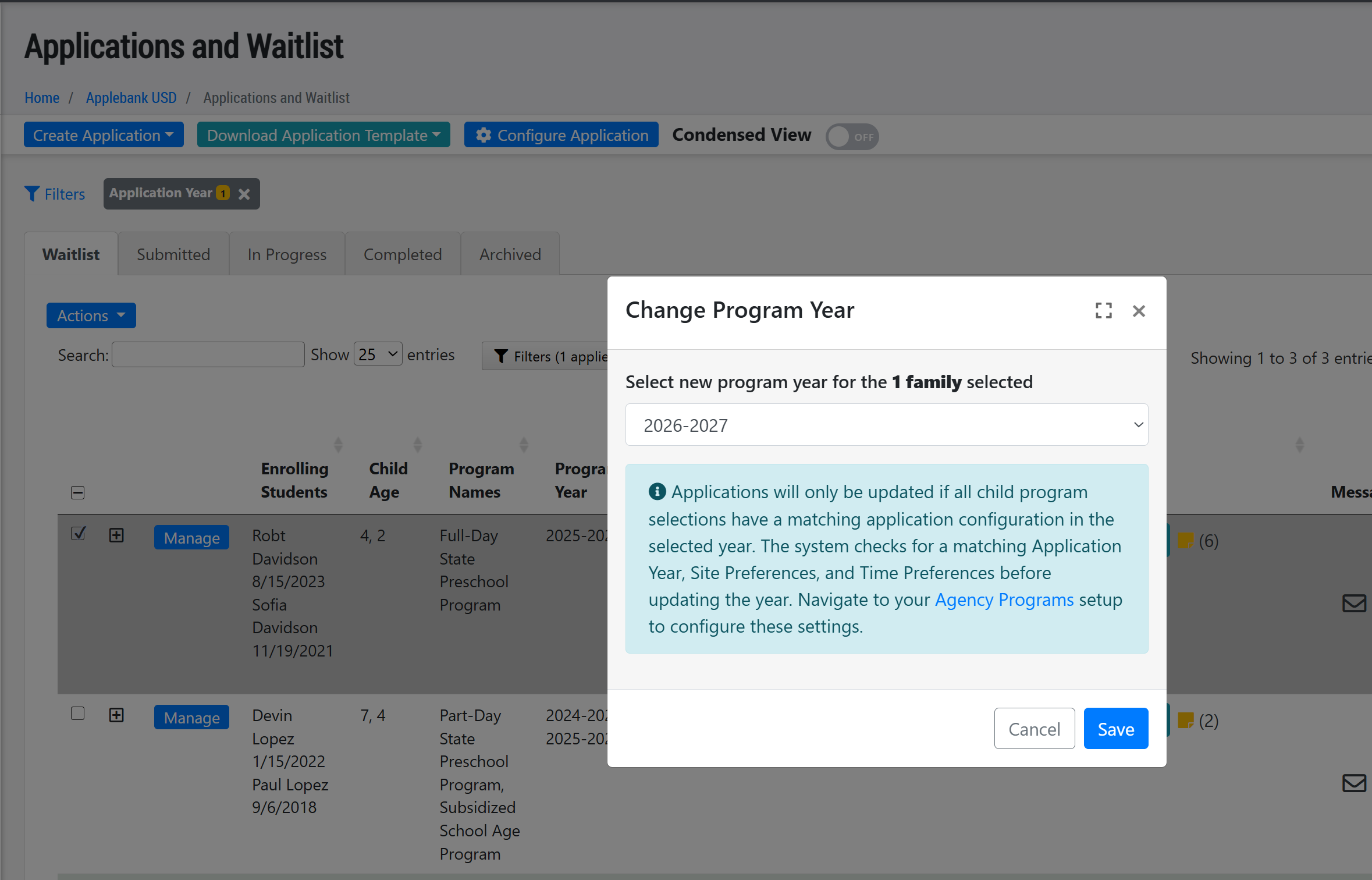
- Once all applications are selected, click on the blue Actions button and select Change Program Year from the dropdown options
- In the modal that opens, select the desired Program Year from the dropdown, then click "Save"
- Note: To ensure a smooth transition over to the new selected Program Year, the system checks to see that the Program Application for the new year has the following items configured. If the conditions below are met, the selected applications will be transferred to the new year with the same Agency Program selection and Site/Time options.
- (1) A program application is setup for the selected year.
- (2) The same Site Preferences and Time Options that the applicants have already selected are available as options in the Program Year that the application is being transferred to.
Repeat this process as many times as needed for any applications that are on the waitlist that need to be carried over into the new program year.
Congrats! You now know how to move waitlisted families between application years! For a verbal explanation with visuals, please refer to the tutorial video below.
Tutorial Video
This 3 minute video will also show you how to move waitlisted families between application years
Was this article helpful?
That’s Great!
Thank you for your feedback
Sorry! We couldn't be helpful
Thank you for your feedback
Feedback sent
We appreciate your effort and will try to fix the article