TABLE OF CONTENTS
- 2026-27 DRDP Rating Periods
- DRDP (2025) Assessment
- CDSS 801A - Reporting Dual Language Learner Data
- Staff Emergency Contacts Roll-Up Grid
- Meals and Snacks Enhancements
- Family Application Enhancements
- Family Fees Comparison Report Updates
- Fixes & Adjustments
2026-27 DRDP Rating Periods
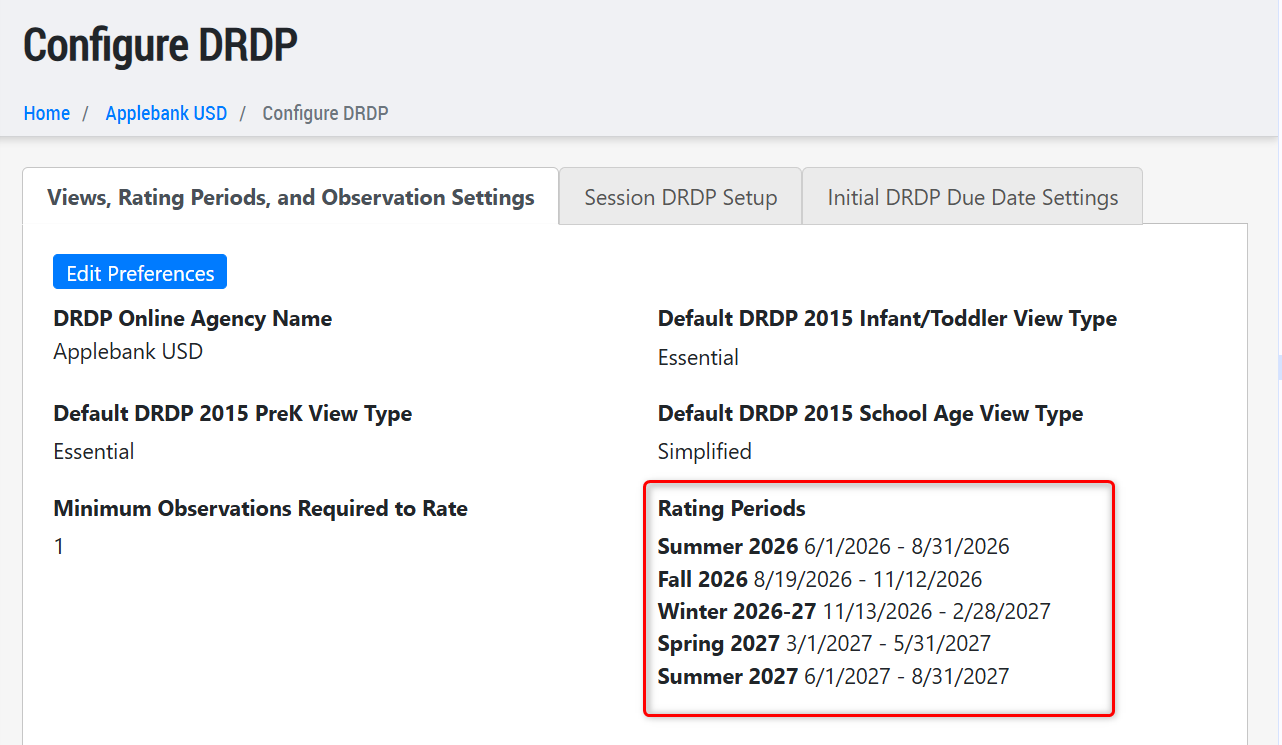
We've imported the new Rating Periods for 2026-2027. The rating period start and end dates will match the Standard Rating Period Date Ranges 2026-2027 listed on the DRDP (2025) Resources page. These rating periods can be updated from your Agency Menu by clicking on Assessments, Referrals, and Inclusion > Configure DRDP > Views, Rating Periods, and Observation Settings.
DRDP (2025) Assessment
We are excited to share that the DRDP (2025) Assessment is now available in your Hubbe system - including the Infant/Toddler (IT), Preschool Transitional Kindergarten (PTK), and Preschool through Third Grade (P-3) assessment view types.
Upon release, classroom staff will have access to all view types when assessing children. The DRDP (2025) assessment types you'll use in each session can be updated on your Agency Menu by clicking on Assessments, Referrals, and Inclusion > Configure DRDP > Session DRDP Setup. Once you set up the DRDP (2025) Assessment type you use at each session, staff can then begin to use that DRDP (2025) Assessment tool when they log into their session/classroom record. See the video below for further instructions on how to set up your session DRDP (2025) Assessment tools.
If the video above doesn't open full-screen, use the following link:
7.10.2026, DRDP (2025) Assessment Updates
The student level DRDP Assessments record has been updated to include new assessment types, but will continue to house any historical DRDP (2015) assessments, as well.
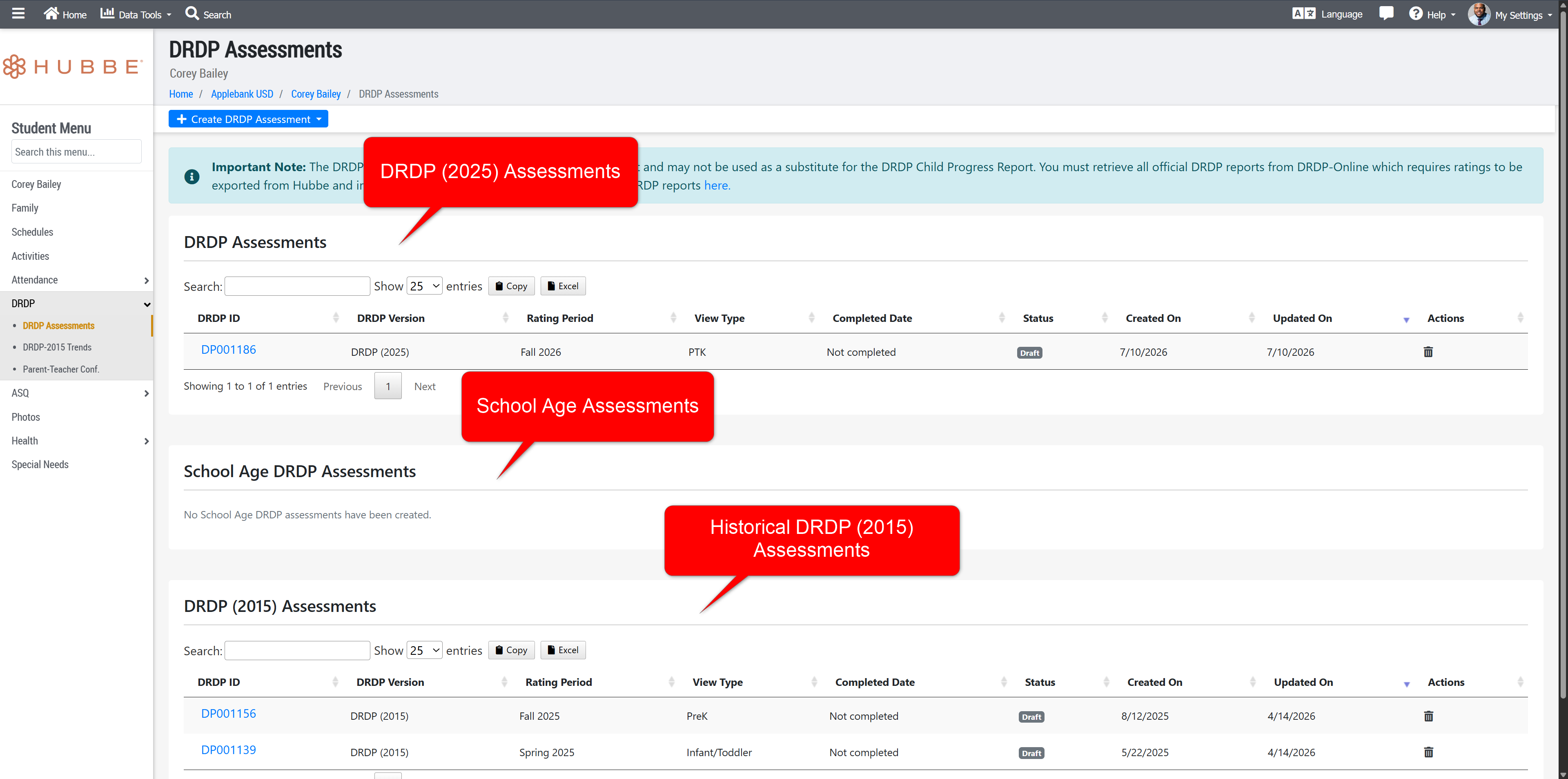
We have also added a new "All DRDP (2025) Assessments" record at all levels, which will feature two tabs - students with assessments, and students without assessments. The first tab will include the DRDP records created for students for the rating period and view type, while the second tab will list all students that have yet to have a DRDP record created for the listed rating period and view type.
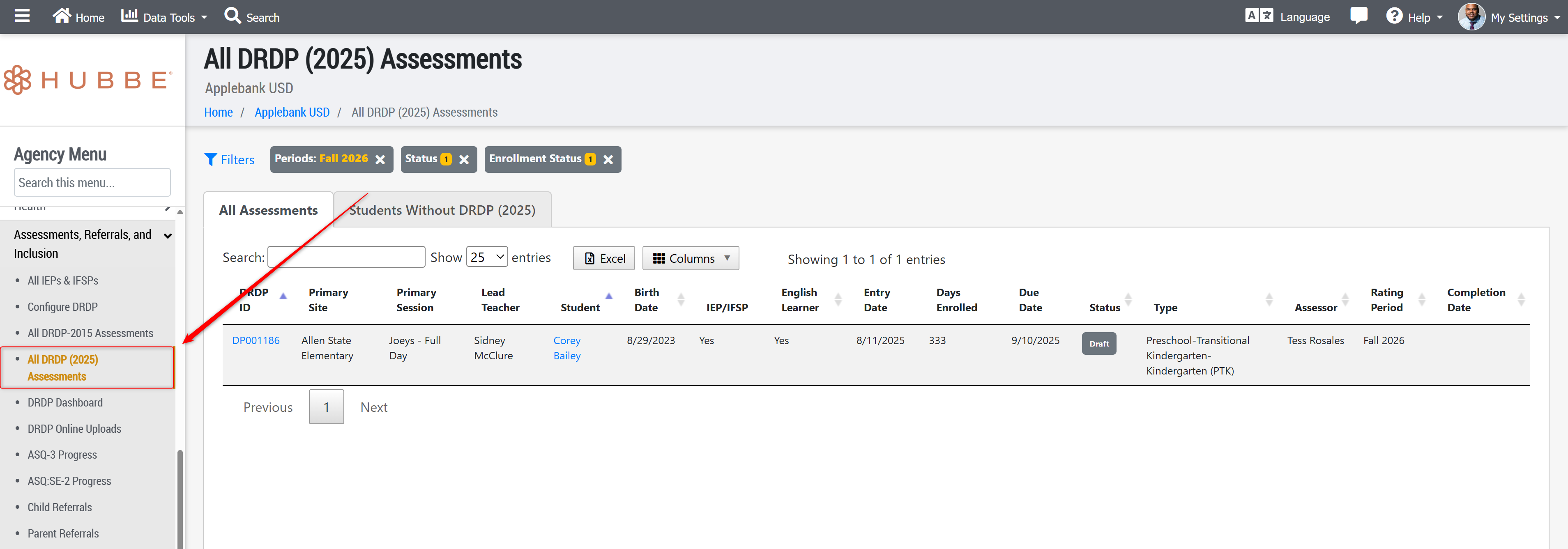
If you use the Manual Upload process, we now have the All Instrument Upload for DRDP (2025) Assessment data. Once you complete your next rating period, download this report to upload to DRDP Online using the Upload Center. Note that we added a filter for only assessments with or without errors to make it easier to identify assessments with missing or incorrect data, and upload assessments that are complete and ready to be transferred.
We've also created the DRDP API to allow for automatic uploads of DRDP Assessment data. If you're interested in using the DRDP API, please reach out to nick@hubbeinc.com to review the setup process.
There will be more updates and features coming to the DRDP (2025) Assessment tool in Hubbe in later releases to support additional reporting capabilities in Hubbe using the DRDP (2025) Assessment data. Look for these updates soon!
CDSS 801A - Reporting Dual Language Learner Data
As detailed in CCB 26-07 released by CDSS, center-based CCTR and CMIG programs will now be required to report data on Dual Language Learners on a bi-annual basis, every October and April, with the addition of new columns added to the 801A monthly report.
In this release, your team can begin to prepare your data within the CDSS CDMIS 801A Report in Hubbe right from the report grid - please note, the new columns will appear as the last nine columns in the grid, and will be greyed out in your July 2026 report month, since it is not currently a reporting month for DLL data. However, your team will still be able to prepare the data in these new columns for your October report.
The TXT file export will leave these columns blank in all reporting months except October and April, where the values will be populated with DLL data collected on families, children, and staff.
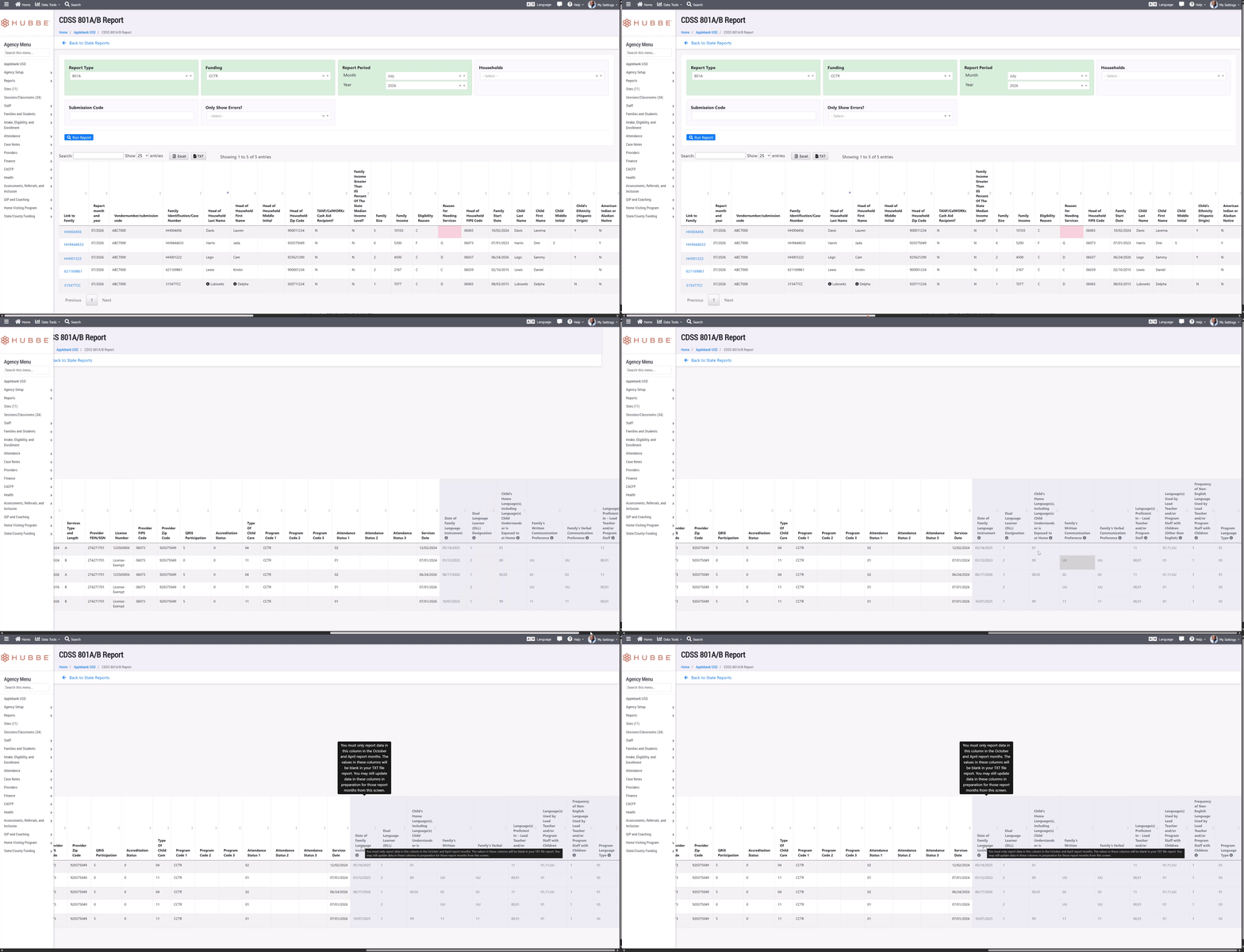
We hope this update eases the data management load for your team regarding these new data requirements.
Staff Emergency Contacts Roll-Up Grid
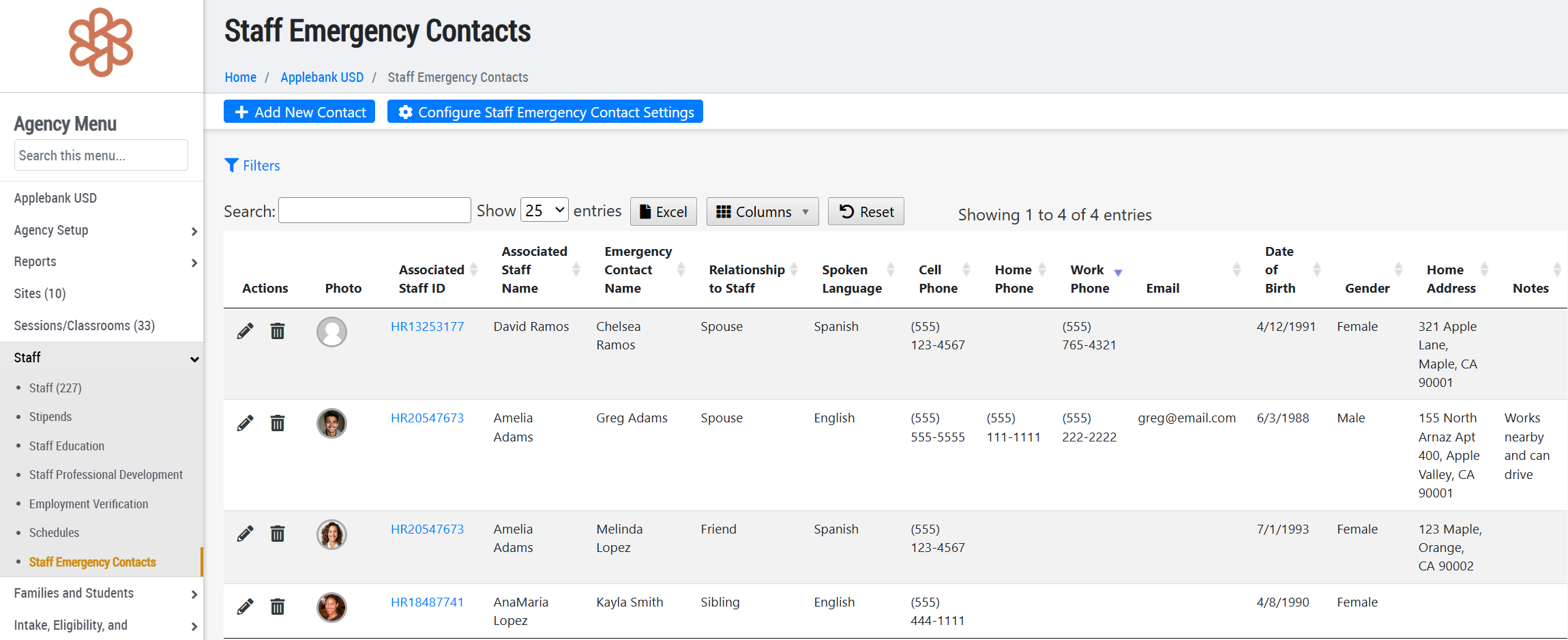
Earlier this year, we released a new "Staff Emergency Contacts" area within a staff record to allow users to enter emergency contacts for themselves or other staff. We are now releasing a roll-up grid of those records across all staff at the agency, found by navigating to: Agency Menu > Staff > Staff Emergency Contacts. New contacts can be made here, existing ones can be edited/removed, and details can be exported from the grid.
Meals and Snacks Enhancements
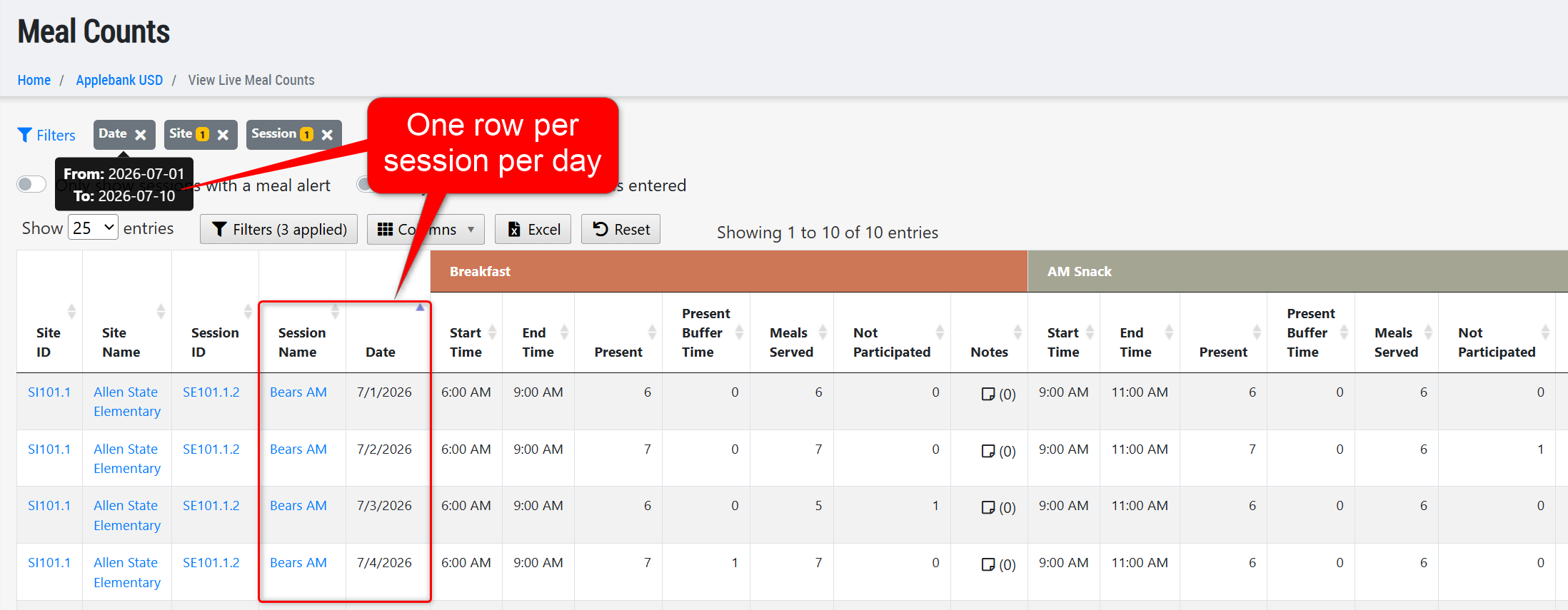
Updated the View Live Meal Counts grid at the agency and site level to allow users to view more than one day of meal counts data at a time in the grid, using the "Date" filter, which previously only allowed a single date selection. Each day will appear as a row in the grid, per session - this means that a "Date" filter of 7/1/2026-7/3/2026 applied to the grid will display 3 rows per session, one for each day.
Family Application Enhancements
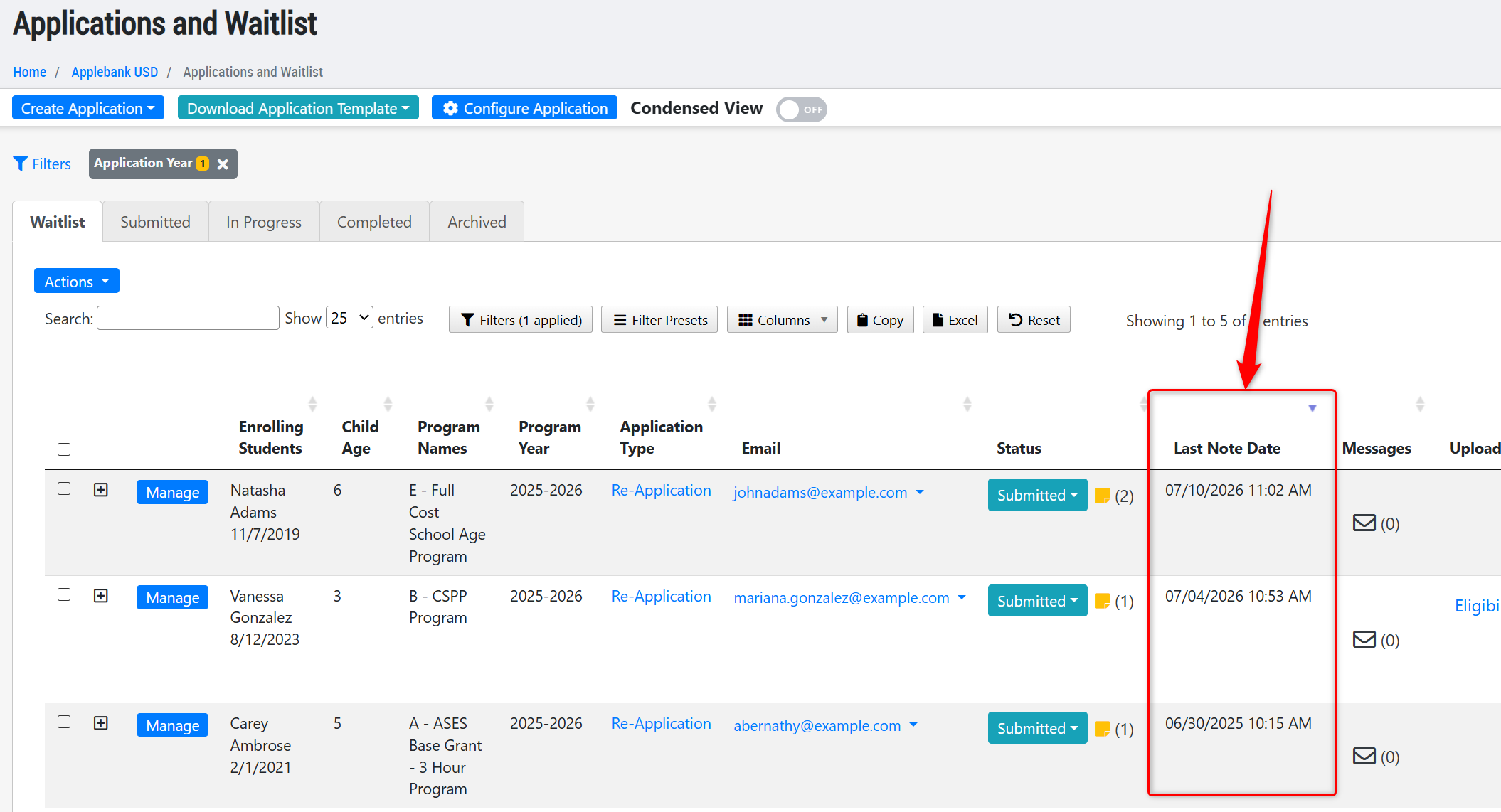
Added a new column to the Applications and Waitlist grids called "Last Note Date" that will display the date and time the last note was added to the family application record. This may help enrollment staff easily identify which applications had recent activity across all applications in the grid.
Family Fees Comparison Report Updates
Updated the Family Fees Comparison Report as follows:
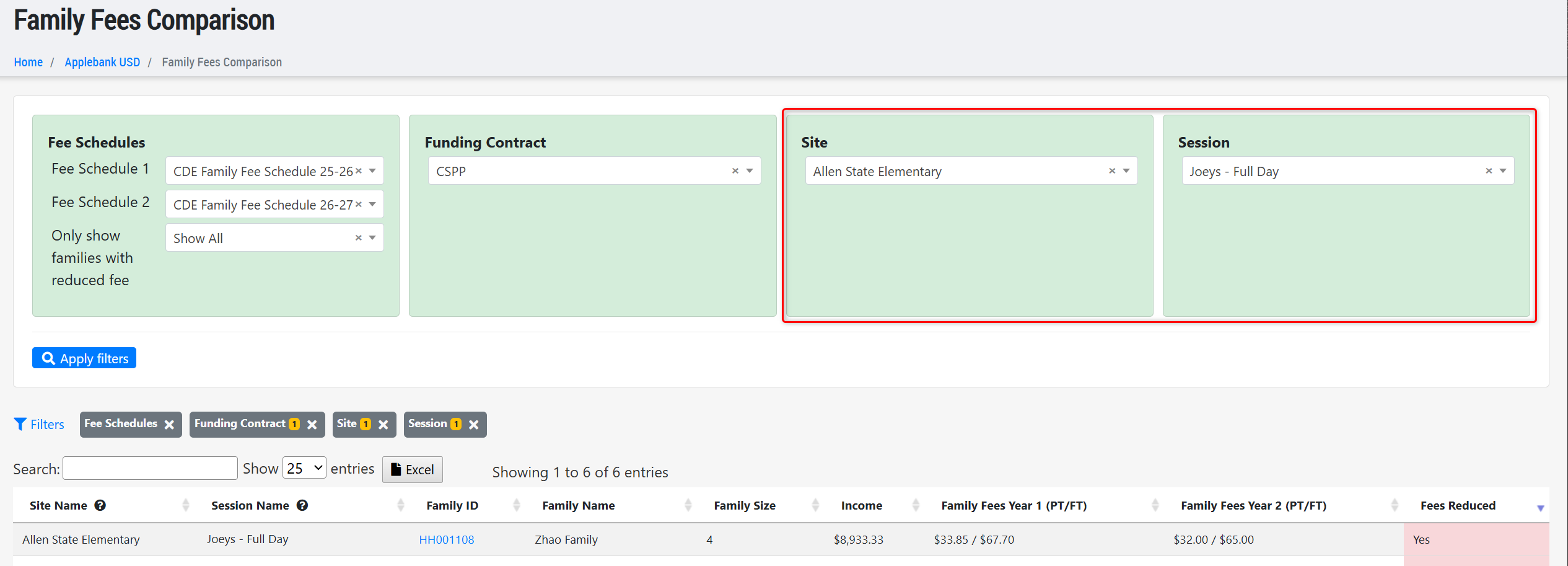
- The report now features two separate filters, one for Sites and one for Sessions. A student will appear in the report if they match the filter combination exactly - for example, a student scheduled to site "Allen State Elementary" and session "Joeys Full Day" will appear when filtered as such below.
- The "Session" filter will only include sessions with Full-Day, Before/After-School, or Other time of days - it will not include sessions that are AM or PM day types.
- Only families with currently active or future enrollments will appear in the report.
Fixes & Adjustments
- Updated the permissions for the Session Admin role to ensure users assigned this role are able to remove/update their Profile Photo within their staff record.
- Updated the Enrollment and Attendance Register (EAR) Report to include children whose entire month was reported as Emergency Closure - Non Reimbursement (ECNR) absence days. These days are not counted towards enrollment or attendance, so the child will be reported with 0 counts for this month, but will be included in the report to display those absences.
- Fixed an issue reported by users regarding the "Schedule Active Date Range" filter on the CACFP Monthly Roster grid, found within the Meals and Snacks Data record at the agency level.
- Fixed an issue reported by users regarding the "Enrolled in HS/EHS" field within the family's Meal Benefit Form.
- Updated the Health Status at Enrollment report to ensure a child with an active Medical Home record satisfies the requirement, removing the 12-month window requirement previously in place.
Was this article helpful?
That’s Great!
Thank you for your feedback
Sorry! We couldn't be helpful
Thank you for your feedback
Feedback sent
We appreciate your effort and will try to fix the article