TABLE OF CONTENTS
- 2026-2027 Year Preparation
- Family Enrollment Enhancements
- Meals and Snacks Enhancements
- CAPSDAC 2.0 Report Updates
- Provider Invoicing Updates
- Student Health Enhancements
- General Enhancements
- Fixes & Adjustments
2026-2027 Year Preparation
As we approach 2026-27, there are several important steps you must complete to continue using the Hubbe system. We created a helpful annual setup guide that we've linked below. Please complete all items listed in the setup guide. In addition to those setup items, we're making many updates to the Hubbe system that we've detailed below.
Helpful Guides to Prepare for the New Year:
- Annual Guide: Preparing Your Program for the New Year (2026-2027) - Click here to view this article
- New 2026-27 CDE/CDSS Family Fee Schedules - Click here to view this article
Additional Updates Being Made:
- The new 2026-2027 CDE/CDSS Income Ranking Tables to determine a family's eligibility for enrollment will be made available in your system starting 7/01/2026.
- To review the announcement for CDE programs, please click the following link (MB 26-03): https://www.cde.ca.gov/sp/cd/ci/mb2603.asp
- To review the announcement for CDSS programs, please click the following link: https://cdss.ca.gov/inforesources/child-care-and-development/fiscal-resources#:~:text=Income%20Ranking%20Table%202026%2D2027
- The new CACFP 2026-2027 Income Eligibility Guidelines to be used in determining a family's meal eligibility (Free, Reduced Price, Base) will be available in your system starting 6/13/2026. Now when users create Meal Benefit Forms for families, there will be a 2026-2027 Program Year option, which will utilize the new income guidelines; however, the 2025-2026 Program Year can still be selected and will use the current 2025-2026 income guidelines.
- To review the announcement on the Federal Register, please click the following link: https://www.federalregister.gov/documents/2026/04/09/2026-06842/child-nutrition-programs-income-eligibility-guidelines#page-17934
- CAPSDAC 2.0 Report - The first reporting period for the new CAPSDAC 2.0 Report will be for July 2026, when the original CAPSDAC report will be retired. The Hubbe system has had the CAPSDAC 2.0 Report available in Beta since November 2025 in participation of Beta Testing within the CAPSDAC portal. The report will officially be "live" and ready for all Hubbe users for the July 2026 reporting period, starting 6/27/2026.
- CDSS 801A Report - Last year, CDSS Programs had to begin collecting DLL information for participating children. They have now announced the reporting requirements for the language data, to be included in the April and October reporting periods of the CDSS 801A Report. We are currently working on adding in the new reported values for the CDSS 801A Report, expected to be available in your system by 7/11/2026.
- DRDP Rating Periods - These have not yet been released, but will be implemented to your system as soon as they are.
- DRDP 2025 - Our team is currently working on implementing the new DRDP 2025 version into your Hubbe system for IT, PTK, and P-3 types, expected to be available in your system by 7/25/2026.
Family Enrollment Enhancements
- In order to assist with enrollment management at your center, we have made the following updates and additions to Roles available to assign to users in your Hubbe system:
- Re-titled the existing role of "Intake and Eligibility Coordinator" to now be "Enrollment Manager." The permissions and access for this role has remain unchanged, and is intended for users who require access to all families at your center for application, enrollment, and certification purposes. This role may caseload the new role detailed below.
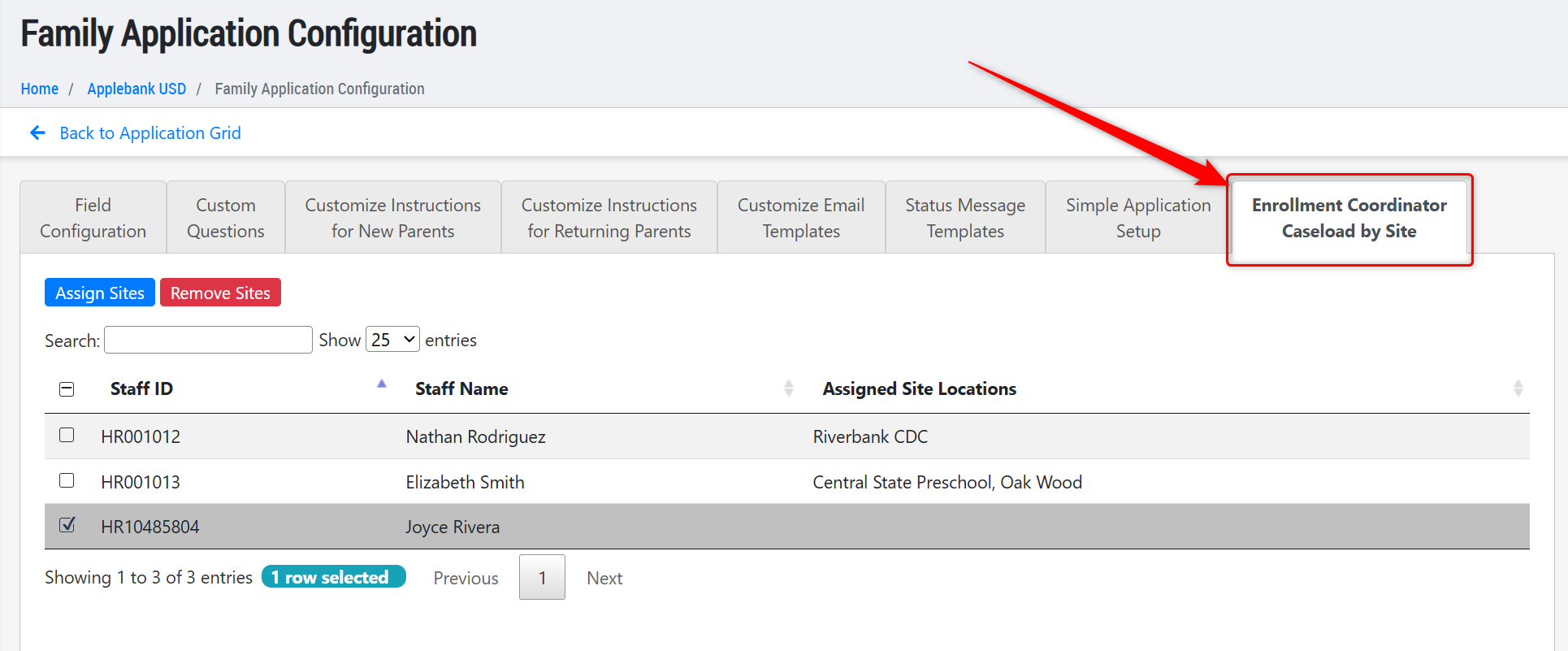
- Added a new role titled "Enrollment Coordinator." This role is designed to replicate the same permissions and access as the "Eligibility Manager" role listed above, but only for the families at their caseloaded sites, rather than for all families at your center. Users assigned this role can be caseloaded sites in the "Family Application Configuration" area, as shown below. How this role works:
- Prior to any site caseload, a user with this role will not see any families or applications in their system.
- By caseloading a site to a user with this role, they will instantly be assigned as "Case Manager" to all Family Applications that have selected that site as a "Site Preference." This assignment as "Case Manager" will continue to occur for every new application that selects this site as a "Site Preference" following the caseload assignment. The Enrollment Coordinator will also be able to access data related to families served at the caseloaded site, beyond the Family Application area.
- If a Family Application removes a "Site Preference" that is linked to an Enrollment Coordinator's caseload, then that Enrollment Coordinator will be removed as the "Case Manager" for that application and will no longer be able to view/manage it.
- If a caseloaded site is removed from the Enrollment Coordinator's caseload, then they will instantly lose access to all of that site's family data and be unassigned as "Case Manager" from all Family Applications that have that site selected as a "Site Preference."
- To summarize the points above, the Enrollment Coordinator will only ever be able to view the Family Applications and all other family/student related data for any site they are caseloaded to. If a caseloaded site is removed, they will lose access to that set of data.
Meals and Snacks Enhancements
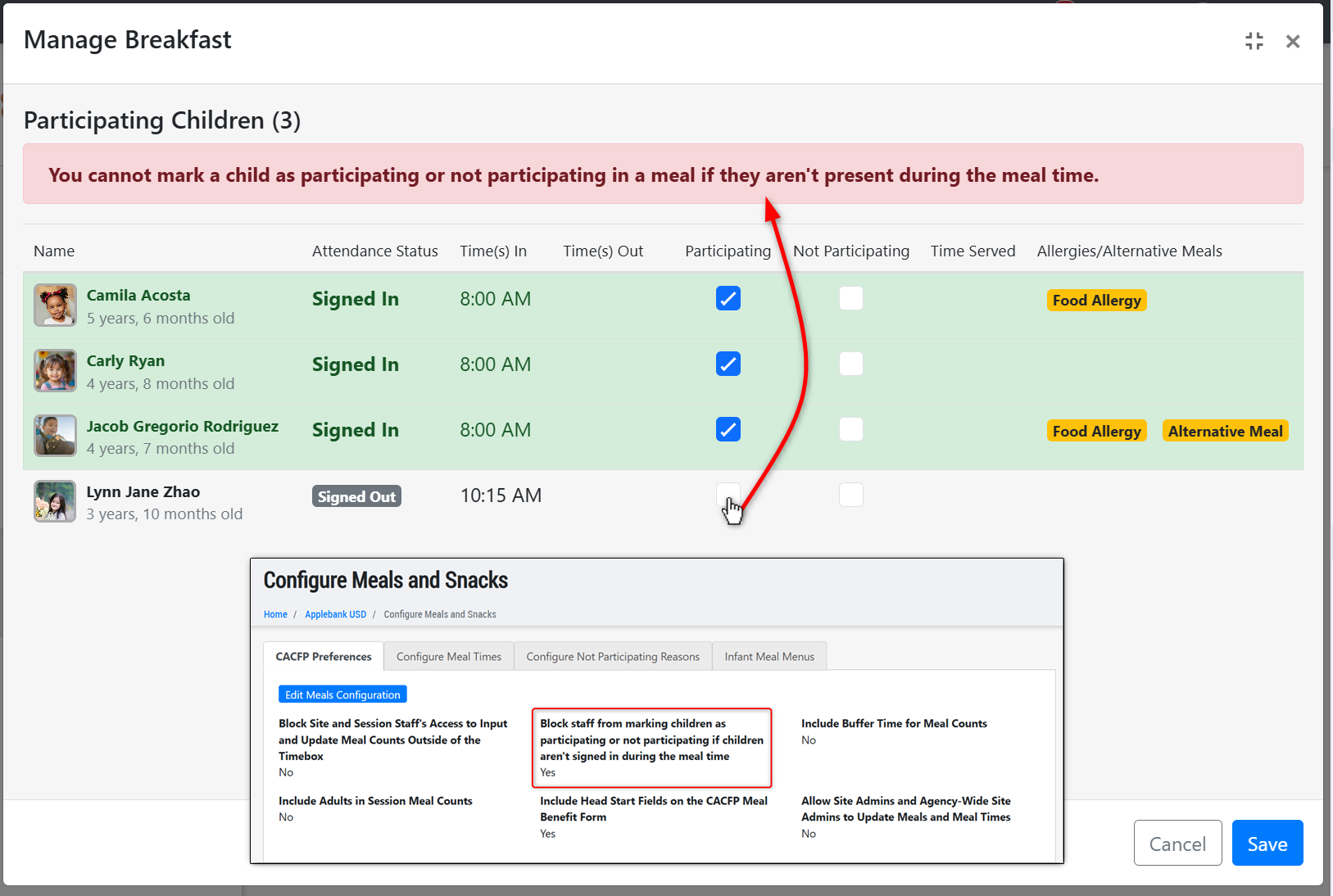
- Added a new preference within the Configure Meals and Snacks > CACFP Preferences area titled "Block staff from marking children as participating or not participating if children aren't signed in during the meal time."
- This setting will be set to "No" by default and will continue to operate as usual upon release of this update. When "No" then staff can continue to mark child as "served" for a meal time, even if they are Unmarked or "Not Signed In" during the meal time. The meal time will continue to alert users that they are marking a meal for a child who is not present for the meal, but will not block staff from marking the meal.
- When set to "Yes" then staff will not be able to mark a meal as served for any child who is "Unmarked" or "Not Signed In" during a meal time. This means the child cannot be marked as Participating or Not Participating for the meal, unless they are present and "Signed In" during the meal time window. This includes and accounts for any buffer time set within the CACFP Preferences area.
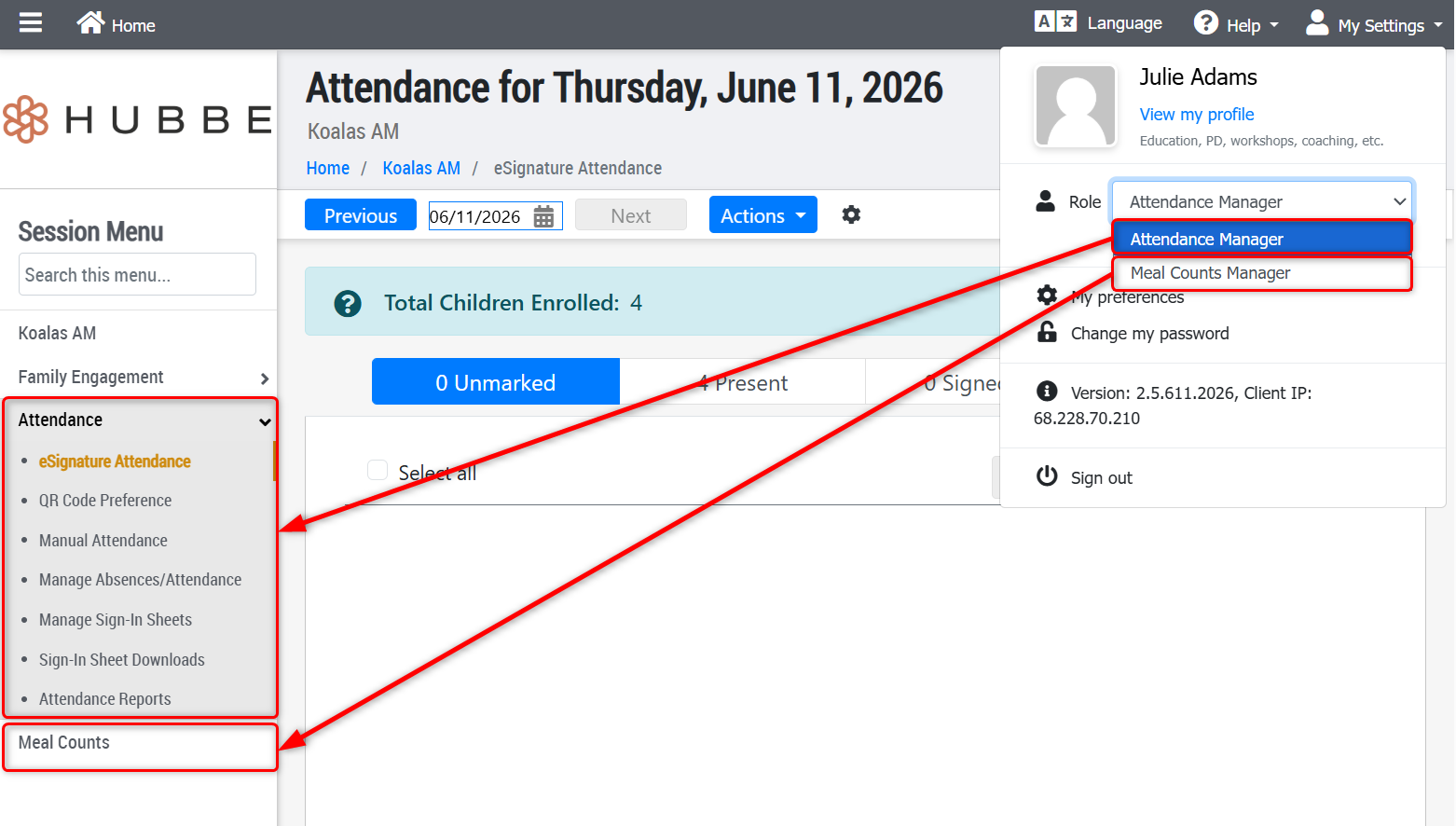
- Created a new role at the session-level titled "Meal Counts Manager." This role will have very limited access to only the session(s) they are assigned to, being restricted to only marking meals served for children at the session, including entering Infant Meals. This role is intended to be paired with the assignment of the "Attendance Manager" role at the session level, if the staff member should have access to both attendance and meal counts for the session.
CAPSDAC 2.0 Report Updates
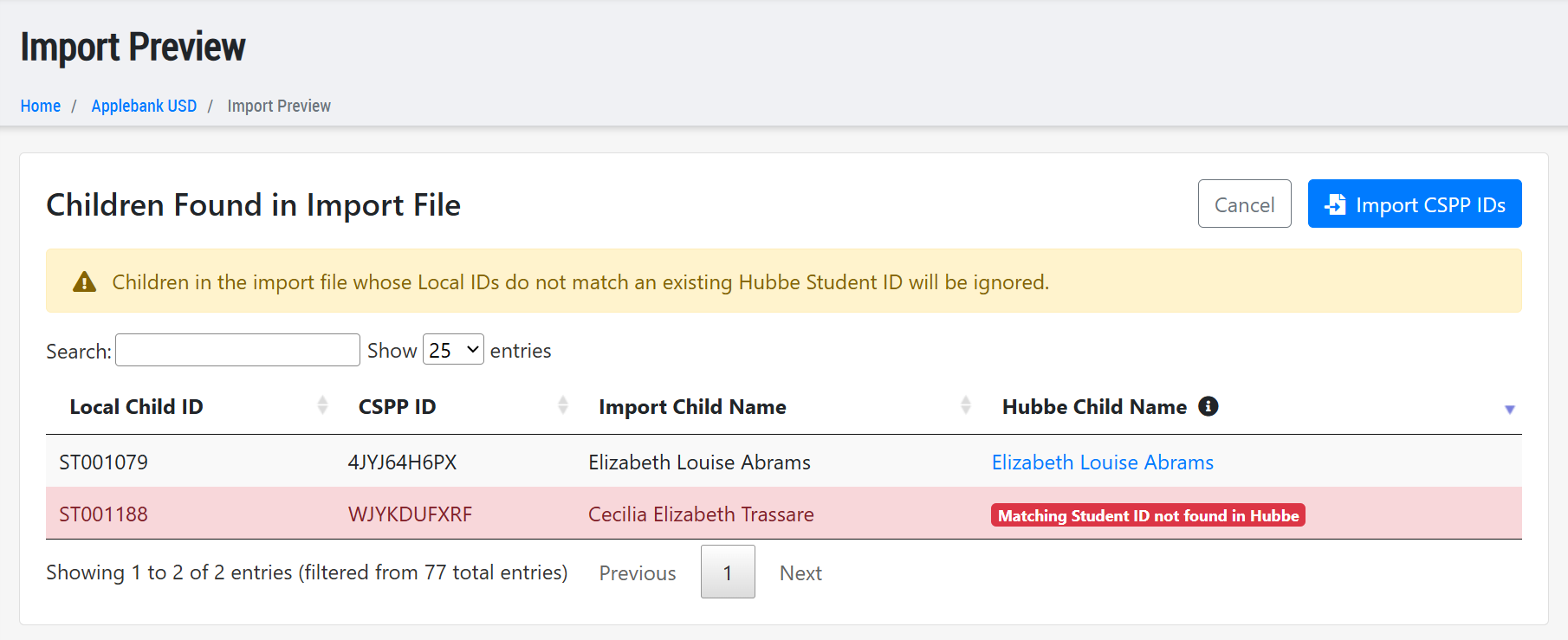
- Created a new tool within the CAPSDAC 2.0 Report feature that allows users to easily Import CSPP IDs into the Hubbe system from the CAPSDAC portal. The CSPP ID is a new field that the CAPSDAC portal is using to identify each unique child record.
Your first submission for the CAPSDAC 2.0 Report will be for the period of July 2026 (due in August 2026). This submission file will not have any CSPP IDs for any child yet. Upon your first submission, the CAPSDAC system will auto-generate a unique CSPP ID for each child included in the report. At this point, you will be able to download a file from within the CAPSDAC portal that will include each reported child with their newly assigned CSPP IDs.
Back in Hubbe, you will now be able to click "Import CSPP IDs" to walk through a few simple steps of importing those CSPP IDs to your student records in Hubbe. Every subsequent submission for these children will then be able to "link" to that child's record in the CAPSDAC portal and update as needed.
Provider Invoicing Updates
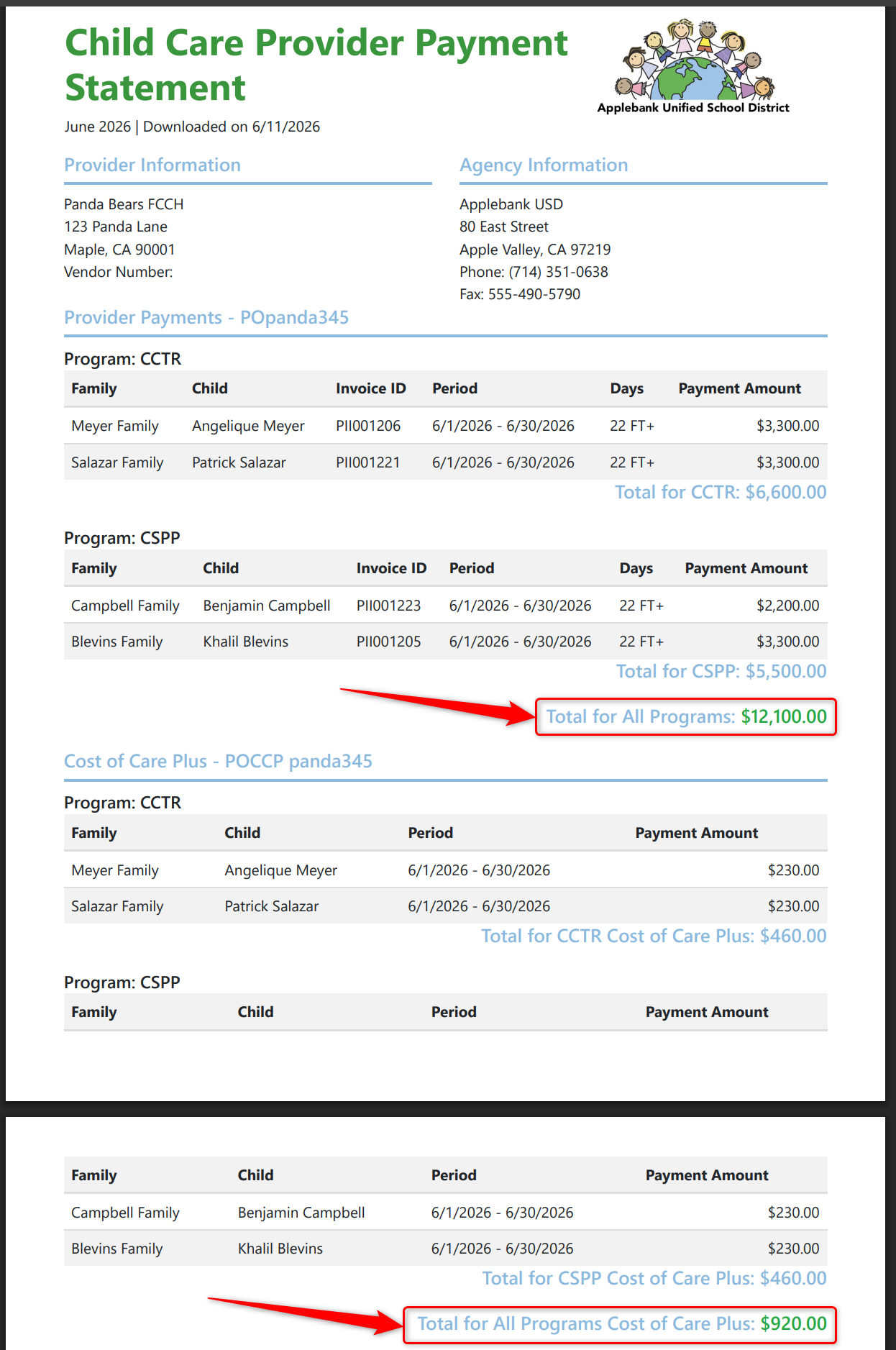
- Added new sub-total values within the Child Care Provider Payment Statement download to display total Provider Payments and Cost of Care Plus payments across all programs served at the site. For example, if both a CSPP and CCTR child are served at a Provider's site, then the "Provider Payments" section of the download will display a breakdown of each respective program's payments and then will additionally display the total Provider Payments for both programs added together - and the same will be shown for the Cost of Care Plus section of the download.
Student Health Enhancements
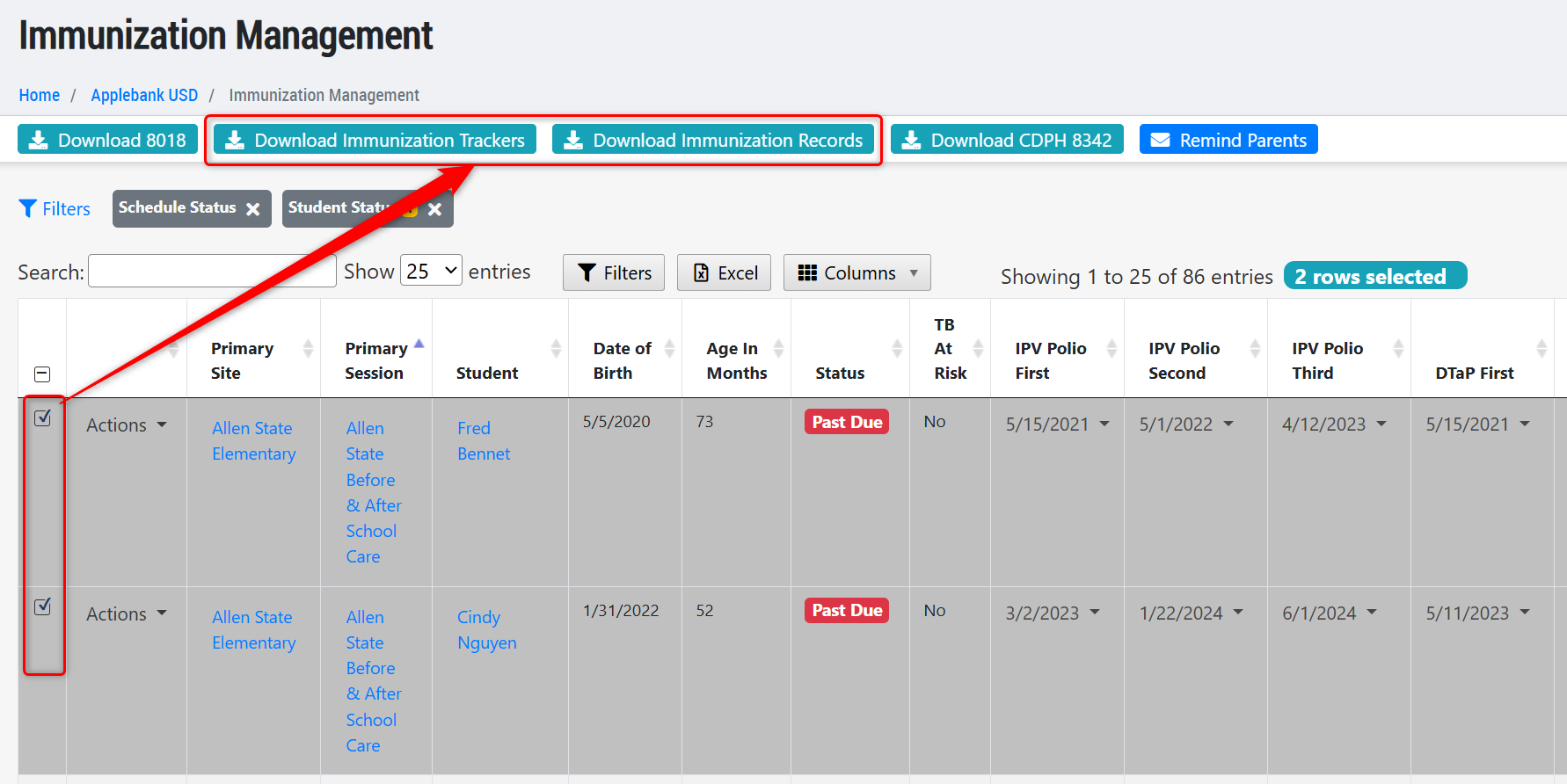
- Updated the Immunization Management grid at all levels to ensure the "Immunization Tracker" and the "Immunization Records" download options only include the students that have been selected in the grid. To download these forms for all students in the grid, users can "select all" on the grid and then choose the desired download.
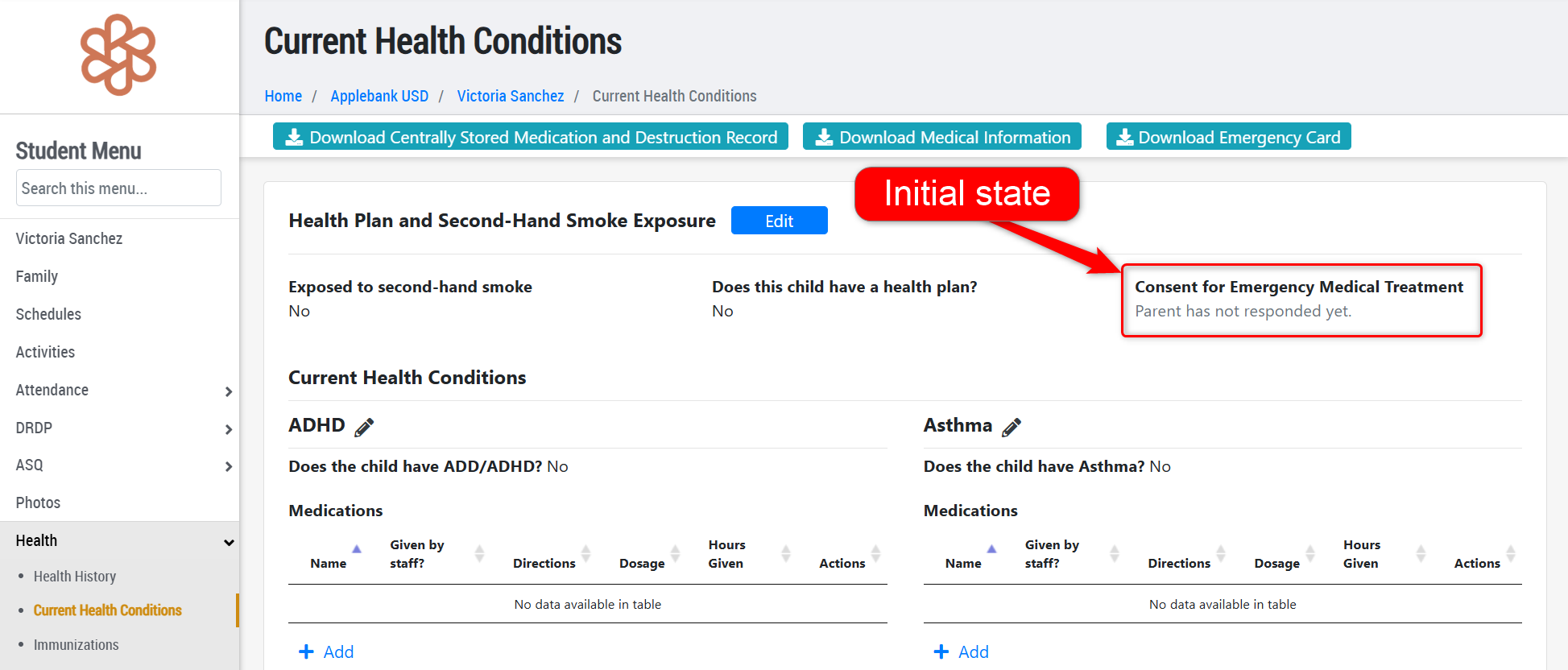
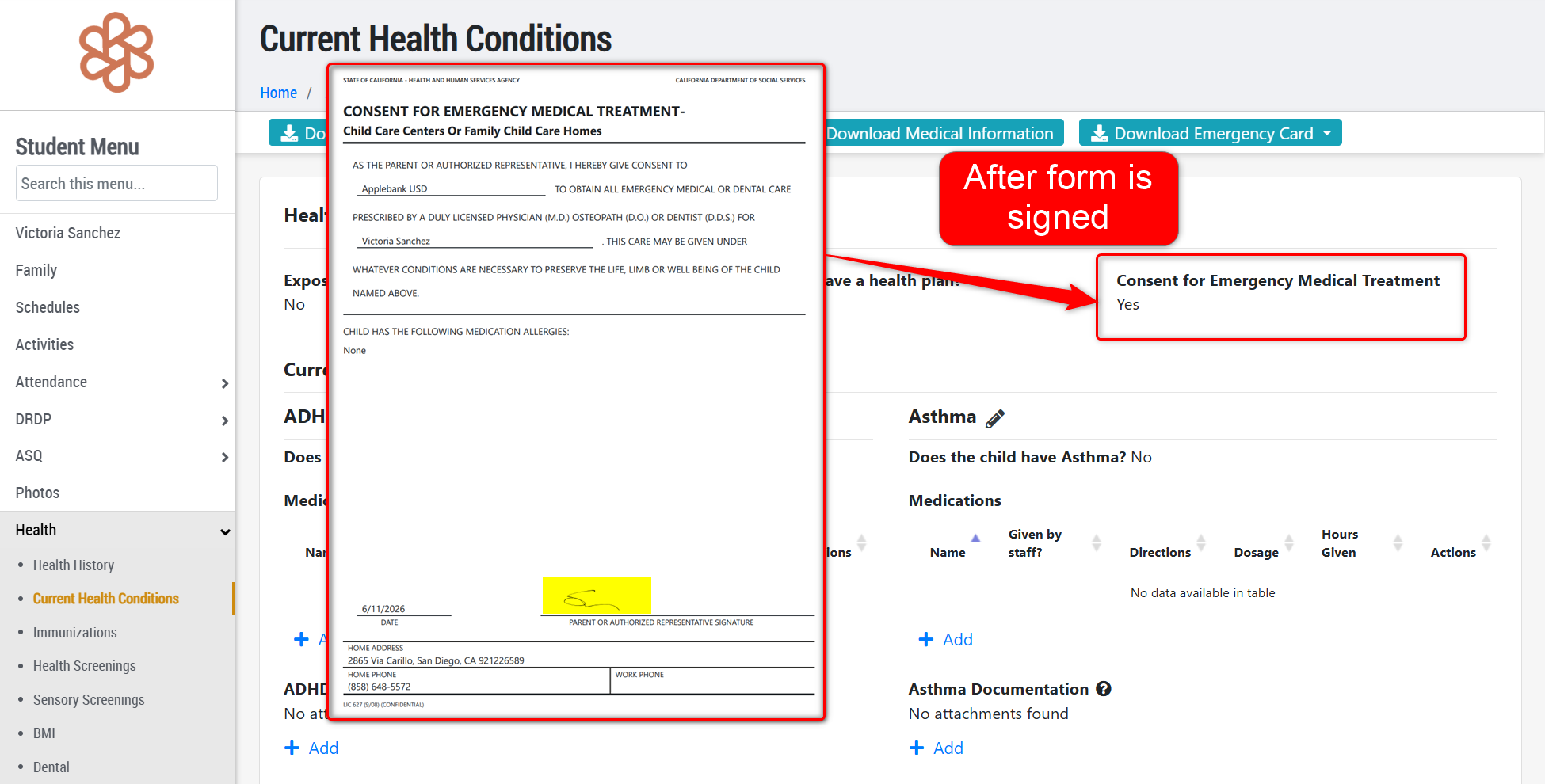
- Added a new field to the student record within the Health > Current Health Conditions record titled "Consent for Emergency Medical Treatment." This student field will work in conjunction with the LIC 627 Form "Consent for Emergency Medical Treatment" by automatically populating to "Yes" once that form has been signed by a parent/guardian of the child. Prior to being signed, the field selection will show "Parent has not responded yet", which differs from the selection of "No" which has to be manually selected. The selection for this field will be included on the child's Emergency Card download.
General Enhancements
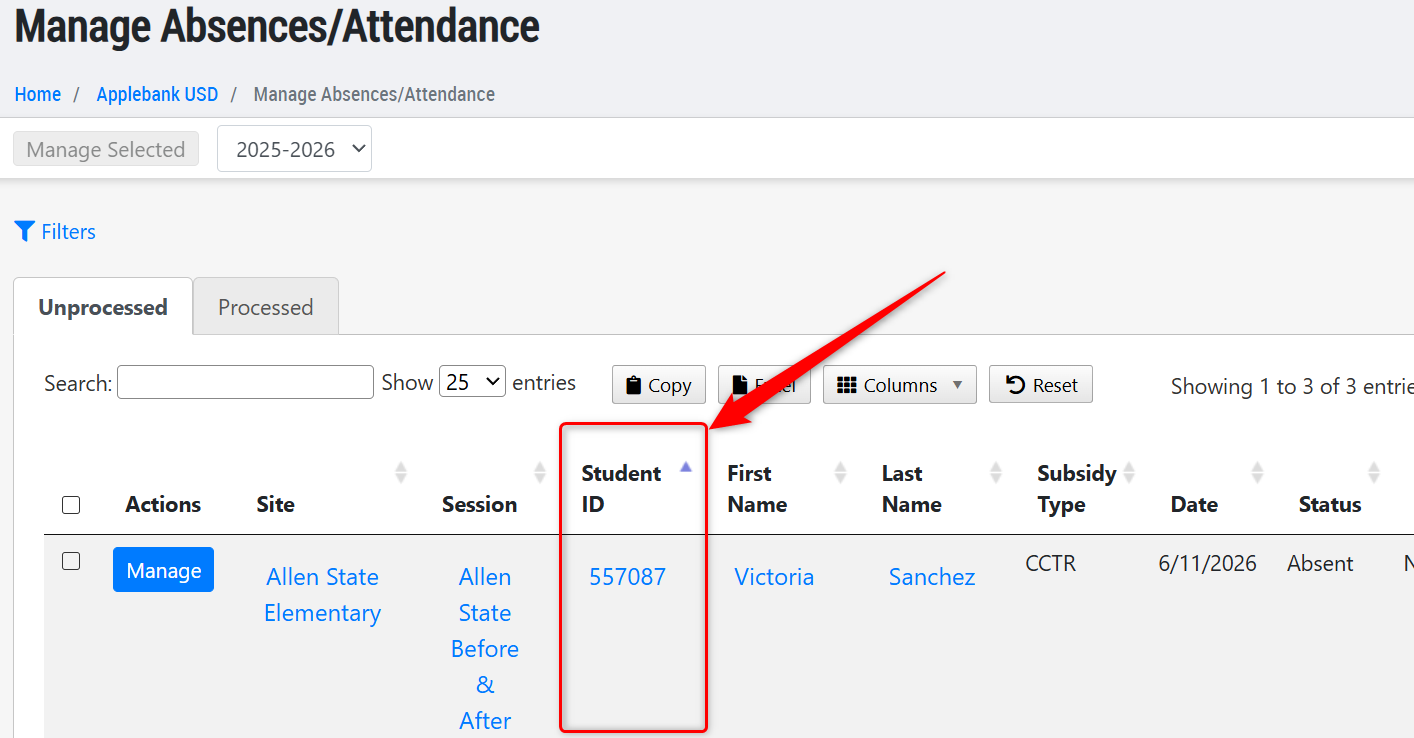
- Added a new column to the "Manage Absences/Attendance" record at all levels (agency, site, and session) for "Student ID." This new column will be hyperlinked to lead the user to the student's Attendance - Monthly record, and will be included in the Excel export of the grid. Users will now be able to use the student's ID in the "search" field on this grid. We have also made other minor updates to this grid, such as re-ordering the columns so that First Name precedes the Last Name, though columns can be shown/hidden and re-ordered however desired, since it is a state-saving grid per user.
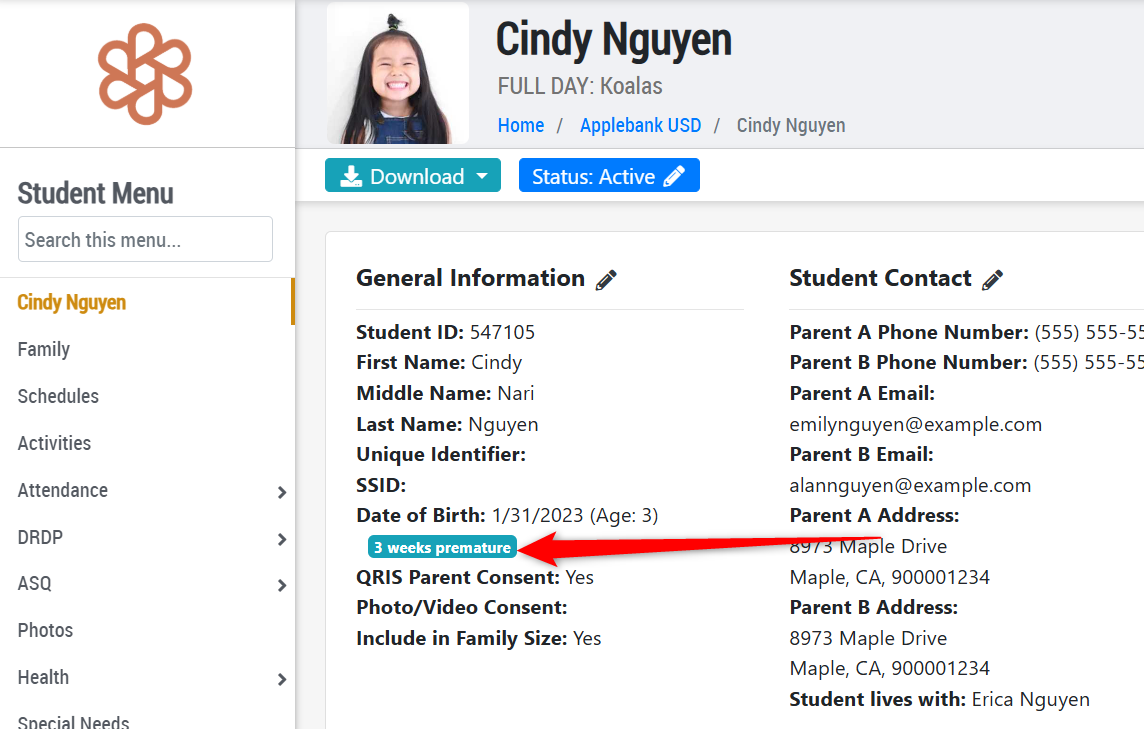
- Added a badge beneath a child's Date of Birth on their Student record if a "Weeks Premature" value is selected other than "Not Premature." This allows users to easily view whether the child is premature and if so, how many weeks.
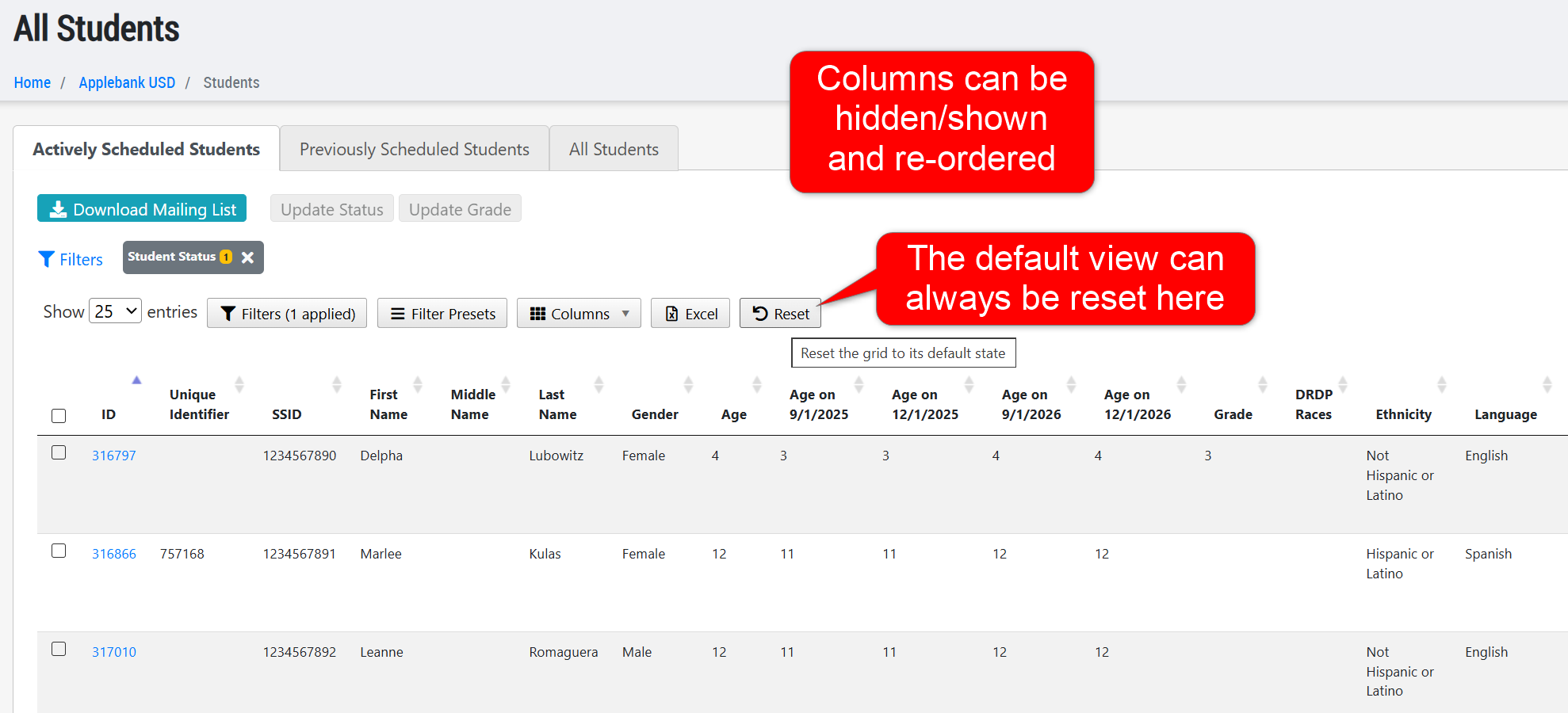
- Updated the All Students grid at the agency and site levels to feature a state-saving tool that remembers the column selection and column ordering applied to the grid. Each time the user exists and re-enters the grid, the custom state configured to the grid will be displayed, unless "Reset" to show the default view again.
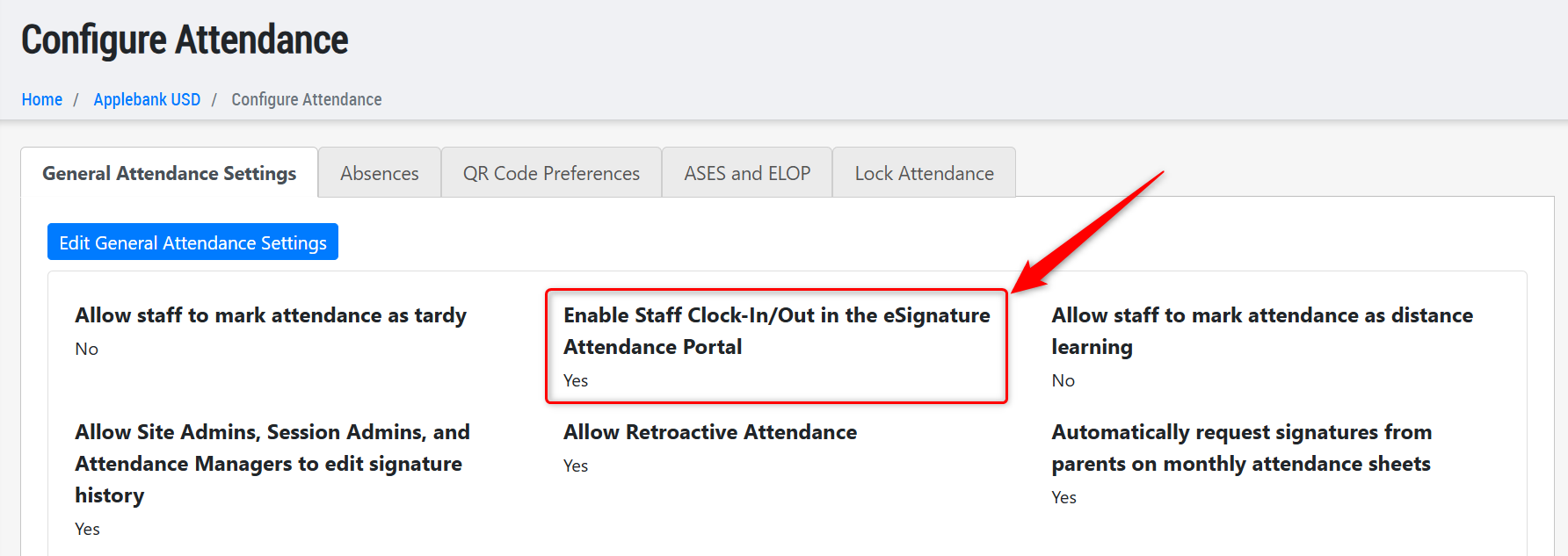
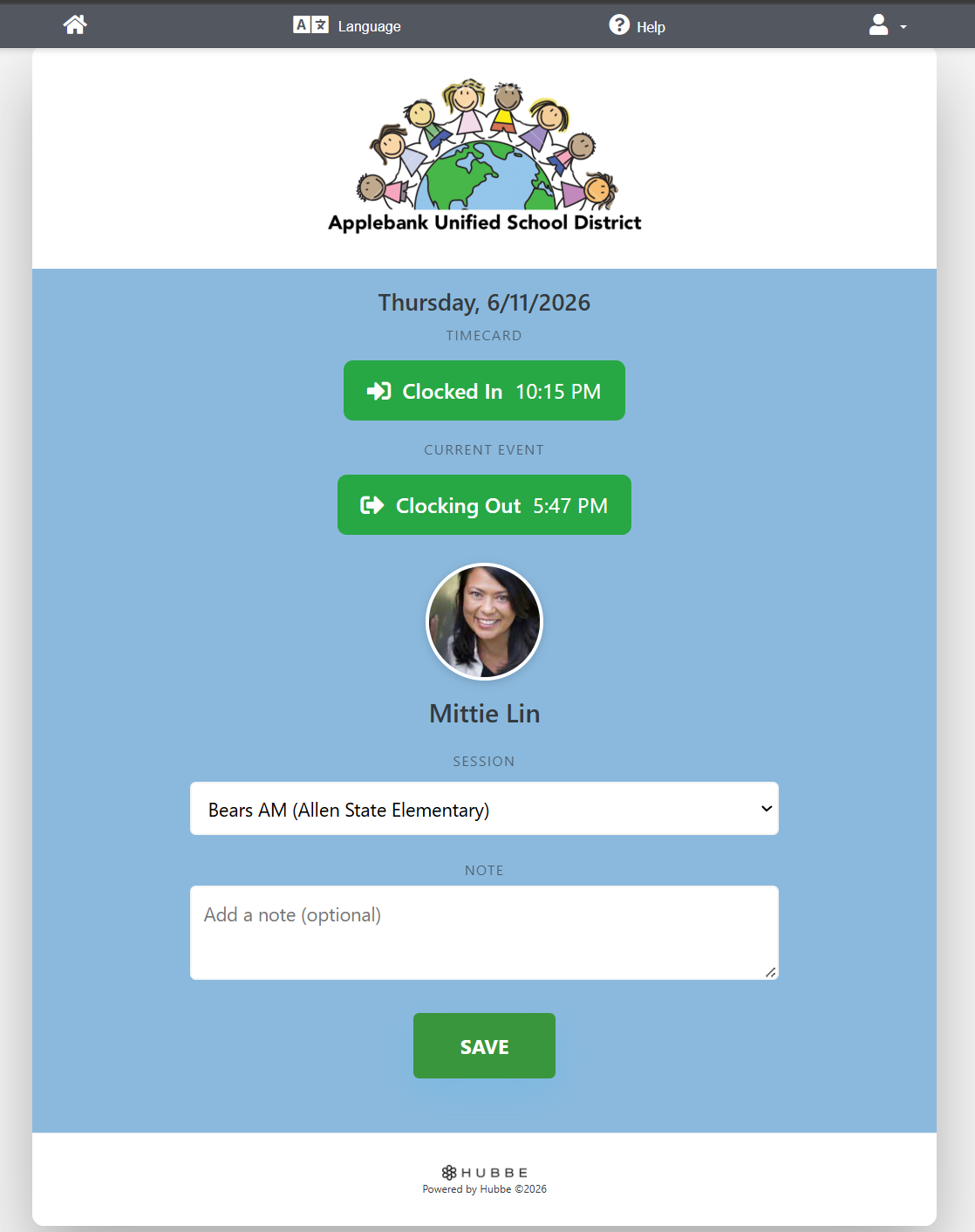
- Added a new setting within the Configure Attendance > General Attendance Settings area titled "Enable Staff Clock-In/Out in the eSignature Attendance Portal."
- This setting will be set to "Yes" by default and continue to operate as normal in the system. Staff will be able to enter their PIN code in any attendance portal to clock in or out.
- When set to "No" then the option to clock in or out will be disabled/hidden from the staff upon logging in to the attendance portal.
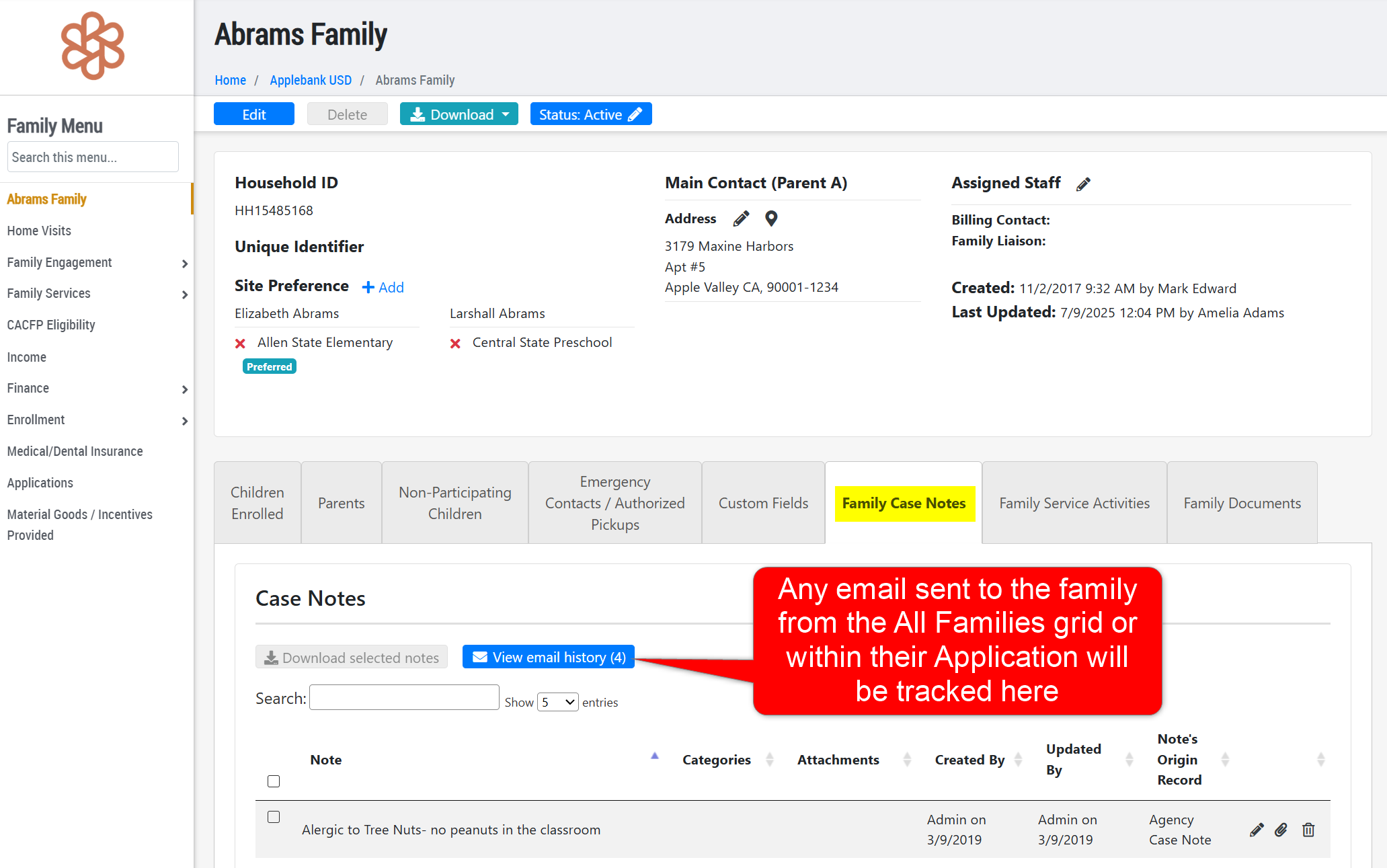
- We have updated several places in the Hubbe system to better track email messages sent to families, as follows:
- Family Applications - Any email message sent to the family from the Applications and Waitlist grid via the "Send Reminder Email" option will be tracked in the "Email History" notes area of the application record. Additionally, when the family application is intaken, the email history will be added to the Household record's "Email History" found within the "Family Case Notes" tab of the household. All family application notes will also be added as case note items within this tab upon intake of the application.
- All Families Grid - From the All Families roll-up grid at the agency level, users can send an email message to selected families. Any email sent to the family from here will now be added to the "Email History" area of a Household record, found within the "Family Case Notes" tab of the household.
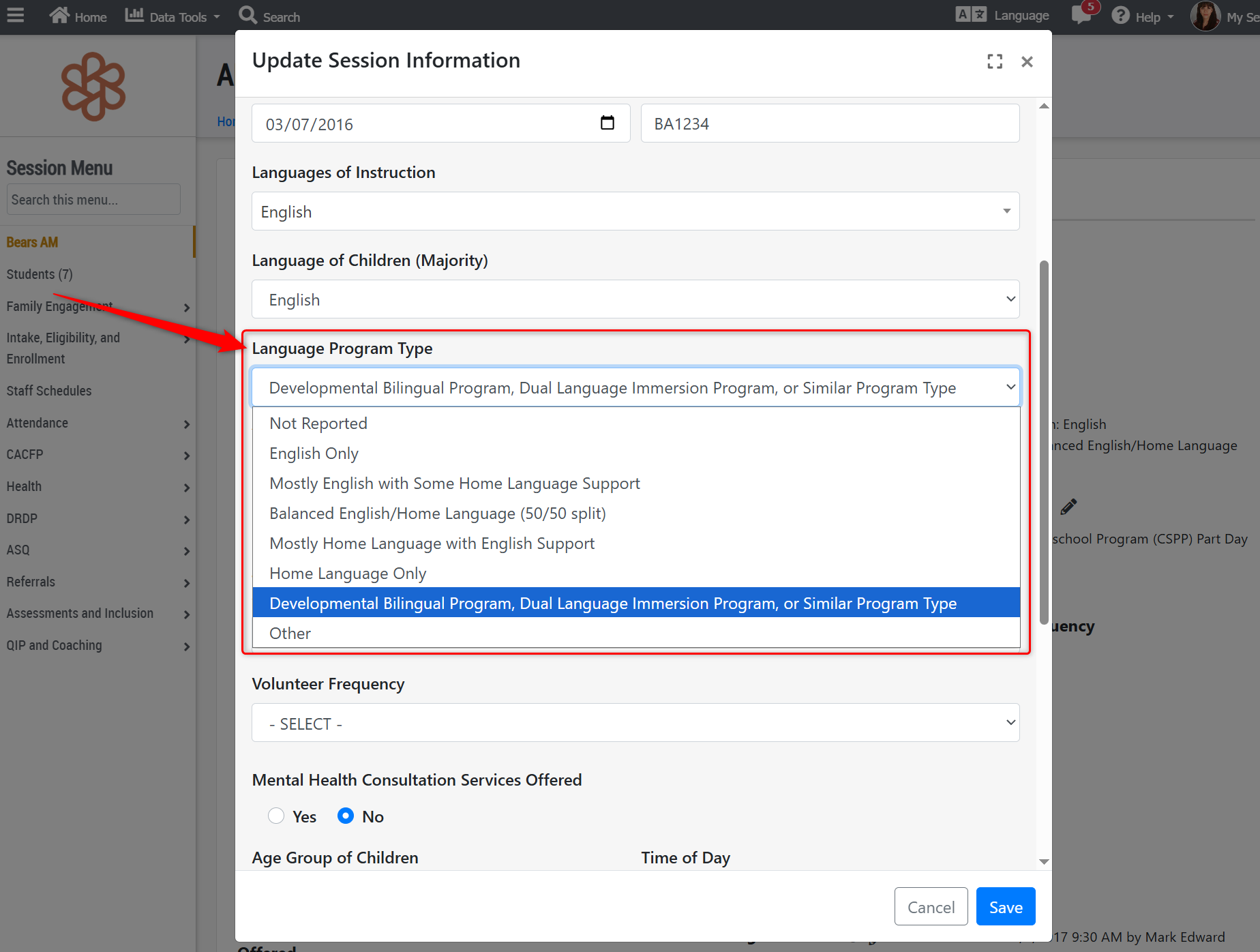
- In preparation for state reporting updates coming soon, we have updated the "Language Program Type" options available for a session record, as listed below. Each option will be mapped to its appropriate code value for the PLIS and CAPSDAC reports (including the CAPSDAC 2.0):
- Not Reported (Default Selection for New Sessions) (Code 00) - The program does not have this information available.
- English Only (Default Selection for Existing Sessions at the Time of Update) (Code 00) - Instruction is provided entirely in English with no intentional use of the home language.
- Mostly English with Some Home Language Support (Code 02) - Instruction is primarily in English, but the home language is used occasionally to support understanding and learning (e.g., key vocabulary, directions, or cultural references).
Balanced English/Home Language (50/50 split) (Code 01) - Instruction is intentionally balanced between English and the home language, with approximately equal time and content delivered in both languages.
Mostly Home Language with English Support (Code 03) - Instruction is primarily in the home language, with English used to support learning and transition.
Home Language Only (Code 04) - Instruction is provided entirely in the Home Language with no intentional use of English.
Developmental Bilingual Program, Dual Language Immersion Program, or Similar Program Type (Code 99) - A program that intentionally integrates both English and the home language throughout instruction. This can include but is not limited to:
Developmental Bilingual Program - Developmental bilingual is a language acquisition program that provides instruction that utilizes English and a child’s native language for literacy and academic instruction.
Dual Language Immersion Program - Dual Language Immersion (DLI) is a language acquisition program that provides integrated language learning and academic instruction for native speakers of English and native speakers of another language, with the goals of high academic achievement, first and second language proficiency, and cross-cultural understanding.
Other (Code 99) - A program that does not fit neatly into the categories above but still serves Dual Language Learners. This may include:
Heritage Language Programs - Programs designed to maintain or revitalize a child’s ancestral or community language, often outside of formal bilingual models.
Informal or Emergent Models - Programs that have a bilingual or dual language approach but are not fully formalized.
*If this option is selected, the CCDD Team may reach out for more information regarding program type.
Fixes & Adjustments
- Added fourth and fifth date options for the Hepatitis B immunization within a student's Immunization record. These new date options will also be included in the Student Import/Export.
- Updated the Child Ratio Schedule download, available at the session level Staff Schedules record, to ensure that the "(5) Children Present" column shows a count of children present within each time block, according to their sign-in/out times for the day.
- Fixed a similar issue with the "Download Daily PDF" document in the Staff Scheduler feature where child attendance counts over the course of the day were incorrect.
- Fixed an issue with the "Download Daily PDF" document in the Staff Scheduler feature where staff shifts weren't showing accurately if they had multiple shifts in one day.
- Added a feature to show and hide staff on the scheduler page.
- Fixed an issue reported by users regarding the Live Excel download of the Staff domain.
Was this article helpful?
That’s Great!
Thank you for your feedback
Sorry! We couldn't be helpful
Thank you for your feedback
Feedback sent
We appreciate your effort and will try to fix the article