Staff can apply custom credit to a family's ledger in a few simple steps. Credit will be automatically applied toward any existing unpaid balance, and if there is none, then applied to any future fees.
As a note - if a family overpays, their overpayment will be applied as credit towards the next fee charged to the family. No action from staff is needed for this to occur.
To add custom credit, follow the steps below:
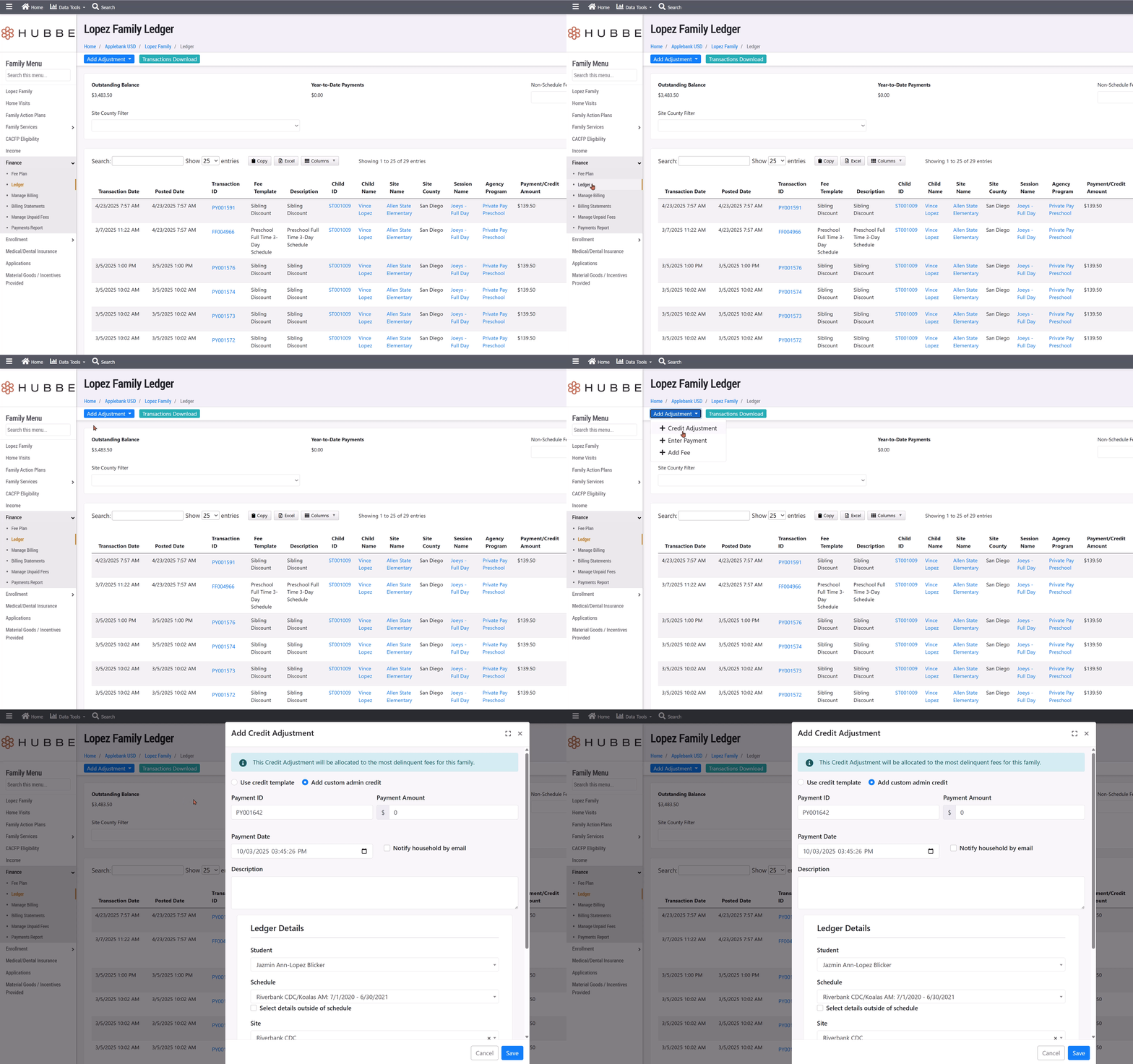
- From the Household record, click Finance > Ledger
- On the family's ledger, click on the top left blue button labeled "Add Adjustment"
- From the dropdown options, select "+Credit Adjustment"
- In the modal that opens, choose the "Add custom admin credit" option to apply a unique amount to the family
- Note - Credit templates can be set up at the Agency level from the Finance > Family Fees Setup > "Credit Templates" tab. We recommend setting up a credit template for reoccurring credits, like vacation credit, but using custom credit for unique fee amounts.
- Leave the uniquely generated "Payment ID"
- Enter the credit amount in the "Payment Amount" field
- The amount of the credit isn't restricted and can be more than the fee due, it will just be allocated to all fee balances (starting with the oldest and working its way forward)
- The "Payment Date" can be edited to record when the credit is applied to the family's ledger
- You can opt to "Notify household by email" to alert the family of the credit applied to their account
- Optionally - you can add a description to record what the credit is for
- In the "Ledger Details" card, the system will default to a student's schedule in the household. You can leave the defaulted schedule as this will not impact what fee the credit will be applied to. Instead, the credit will be automatically allocated to the oldest fee with a balance due.
- To complete the process, click the blue "Save" button
- The credit will be applied to the family's ledger automatically
Was this article helpful?
That’s Great!
Thank you for your feedback
Sorry! We couldn't be helpful
Thank you for your feedback
Feedback sent
We appreciate your effort and will try to fix the article