TABLE OF CONTENTS
- Family Engagement Enhancements
- Head Start Health Enhancements
- Attendance Enhancements
- General Enhancements
- Fixes & Adjustments
Family Engagement Enhancements
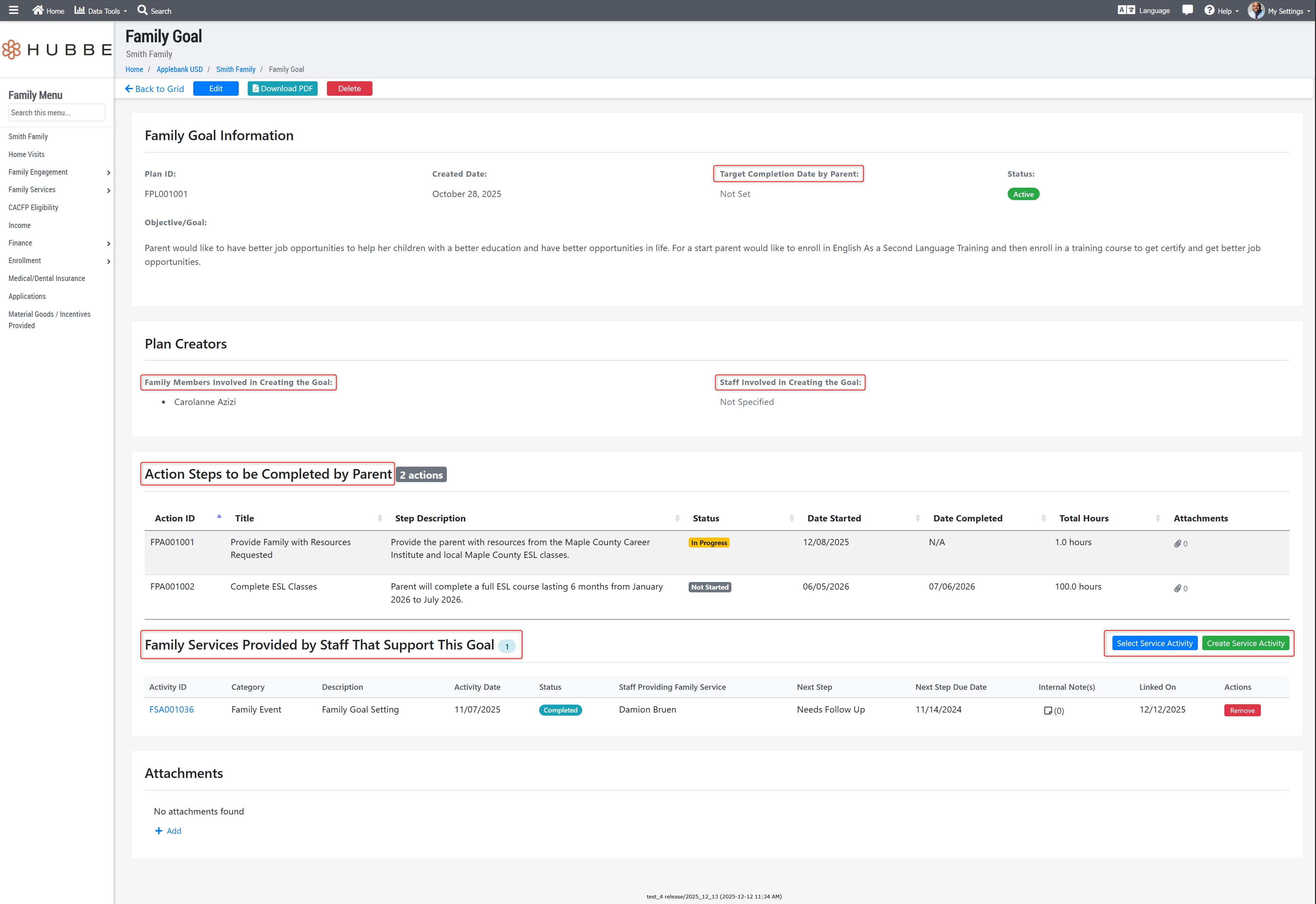
- Updated the Family Goal record with the following improvements:
- Added an attachments section for users to add attachments to Action Steps within a goal.
- Updated the text body of the goal's description and each action step's description to offer text formatting options, such as bolding, underlining, bullet points, etc.
- Updated the field previously titled "Parent Who Created the Goal" to "Family Members Involved in Creating the Goal."
- Updated the field previously titled "ECE Agency Staff Who Created the Goal" to "Staff Involved in Creating the Goal."
- Updated the field previously titled "Due Date" to "Target Completion Date by Parent."
- Updated the section previously titled "Action Steps" to "Action Steps to be Completed by Parent."
- Added a new section to the Family Goal record for "Family Services Provided by Staff That Support This Goal," where users can create new or add existing family service activities to link them to the Family Goal.
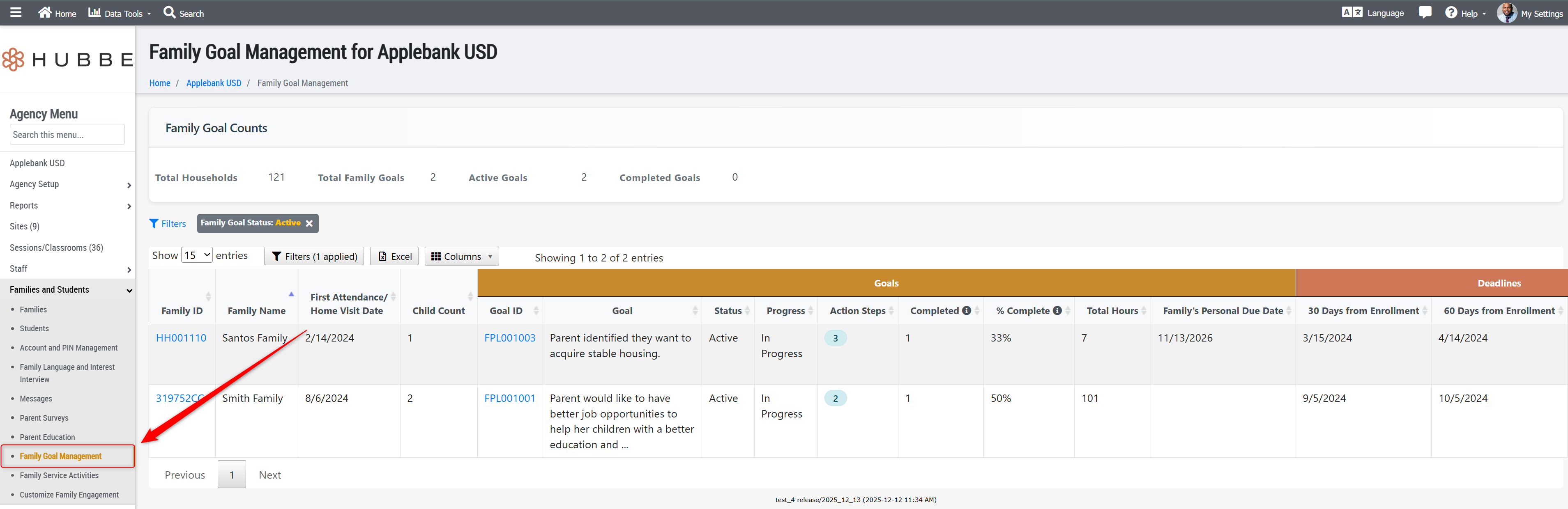
- Added a newroll-up grid for Family Goals at the agency, site, and session levels. At the agency level, this new record will list all Family Goals created for all families at the agency. The site and session levels will only list the goals for families scheduled to those sites/sessions. This grid will allow users to view goal information, action steps for the goals, and edit or download goals. Additionally, this grid will also list families who do not yet have a Family Goal created with the family's "First Attendance / Home Visit Date" and a 30-60-90 Day deadline listed in their respective columns for staff to easily track family due dates. There are many filters featured on the grid to allow users to easily find families with due dates in a selected range, or for goals with selected statuses, for example. We hope this grid helps your team easily manage your families' enrollment into Head Start Programs.
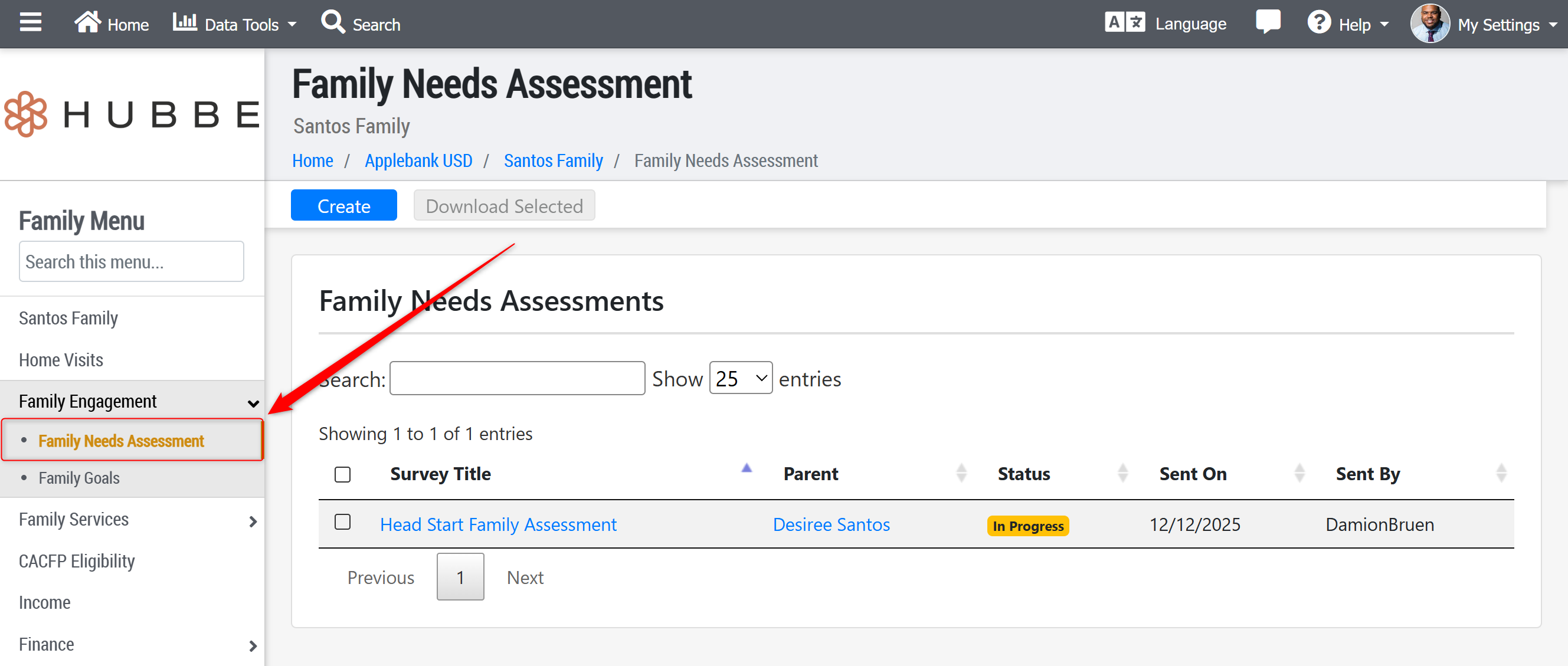
- Created a new record item on the Family Menu called "Family Needs Assessment" in the Family Engagement sub-menu. This record allows users to invite parents to any parent surveys created using the "Family Strengths and Needs Assessment" template. Users can assist parents with completing the survey from this record, and view/download responses. The survey responses will also be viewable from the agency-level Parent Surveys feature for the survey completed by the parent(s). This record item has been added to assist with the process of enrolling a child into a Head Start program, starting with the completion of a Family Strengths and Needs Assessment survey.
- Added the Filters tool and many new filter options to the Family Service Activities grid, found at the agency and site levels within the "Families and Students" sub-menu, and the session level within the "Family Engagement" sub-menu. Users can now utilize filters such as Activity Type, Status of Activity, Category, or Next Step Due Date range to easily filter for activities with the selected criteria.
Head Start Health Enhancements
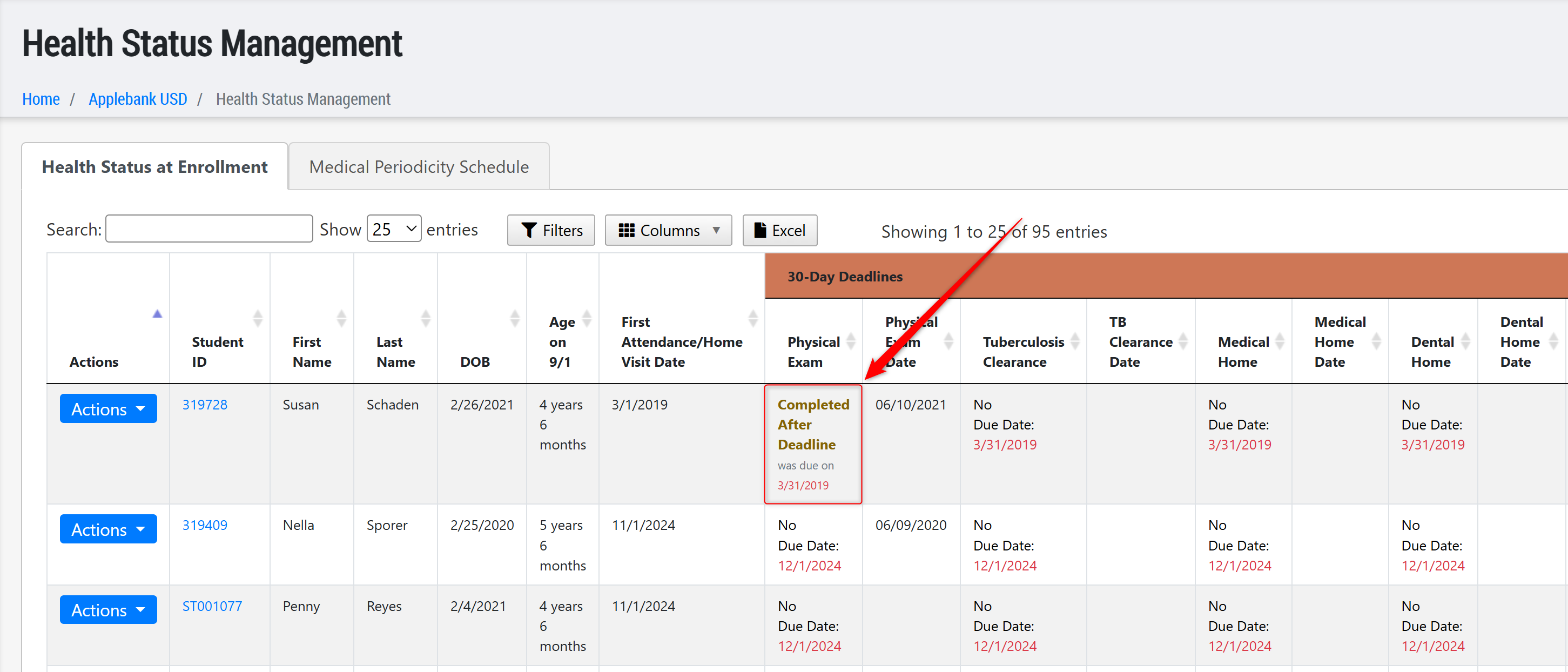
- Updated the Health Status Management grid to display "Completed After Deadline" for any health screening completed after the listed due date. Additionally, we have updated the validation requirements for each health screening so that any screening completed within 12 months before the due date will satisfy the requirement.
Attendance Enhancements
- Updated the eSignature Attendance record at the session level and the View eSignatures record at the site and agency levels with the following improvements:
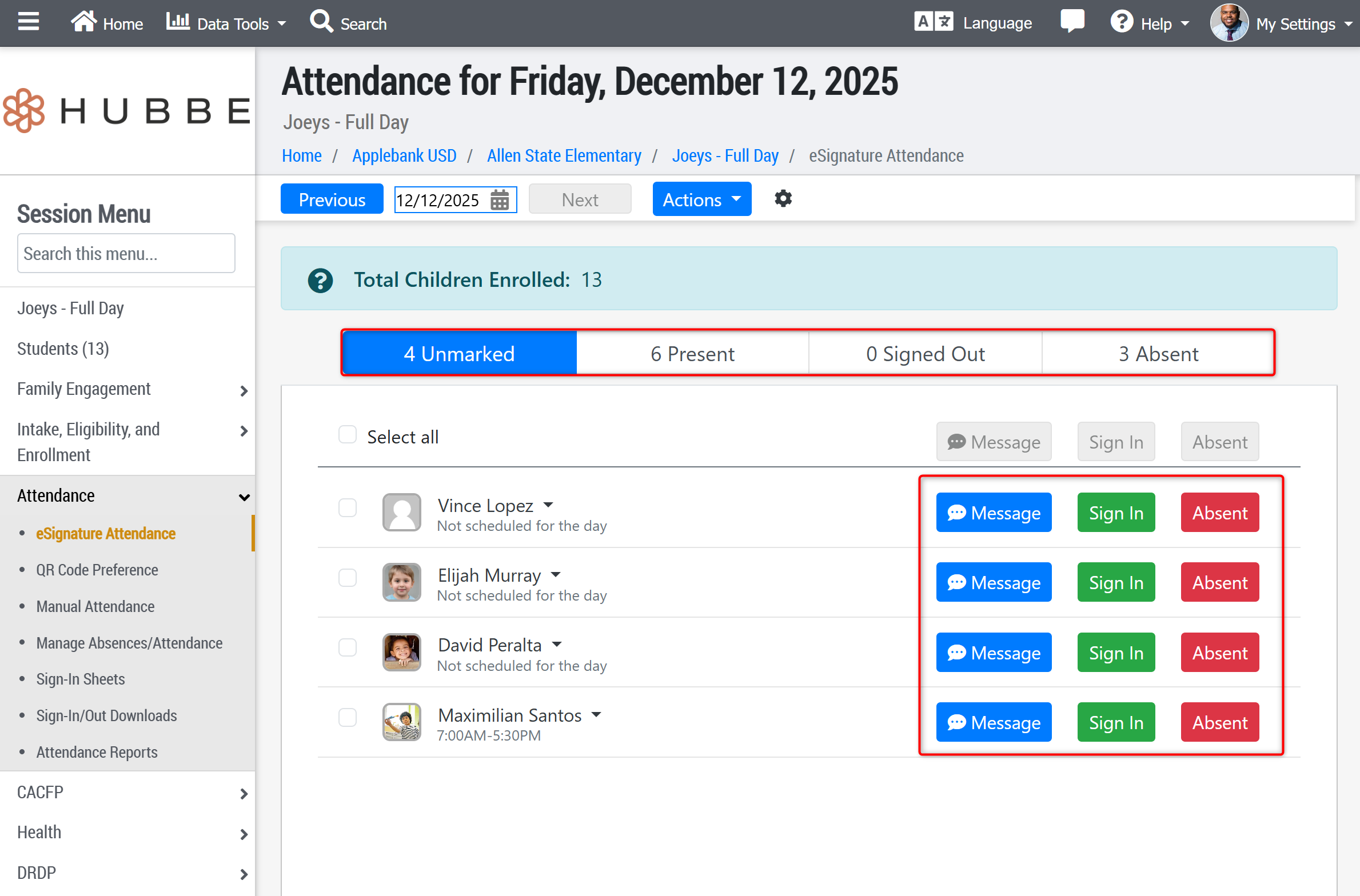
- Updated the tab sections for the attendance statuses to now be: Unmarked, Present, Signed Out, and Absent. These changes are detailed below:
- Added a fourth tab section titled "Absent," where students who are absent for the day will be moved to and counted
- Updated the previous tab sections' titles as follows: "Here" is now "Present", and "Not Here" is now "Signed Out."
- Added "Sign In" or "Sign Out" buttons (depending on the section the child is in) to each row beside each child listed. This allows users to click "Sign In/Out" for any child they wish to mark attendance for, but will still have the option to multi-select several students and batch sign in/out children together.
- Added "Absent" buttons to each row beside each child listed, so that users can simply click "Absent" beside any child to mark them as such, but will still have the option to multi-select several students and mark them absent in batch.
- Updated the tab sections for the attendance statuses to now be: Unmarked, Present, Signed Out, and Absent. These changes are detailed below:
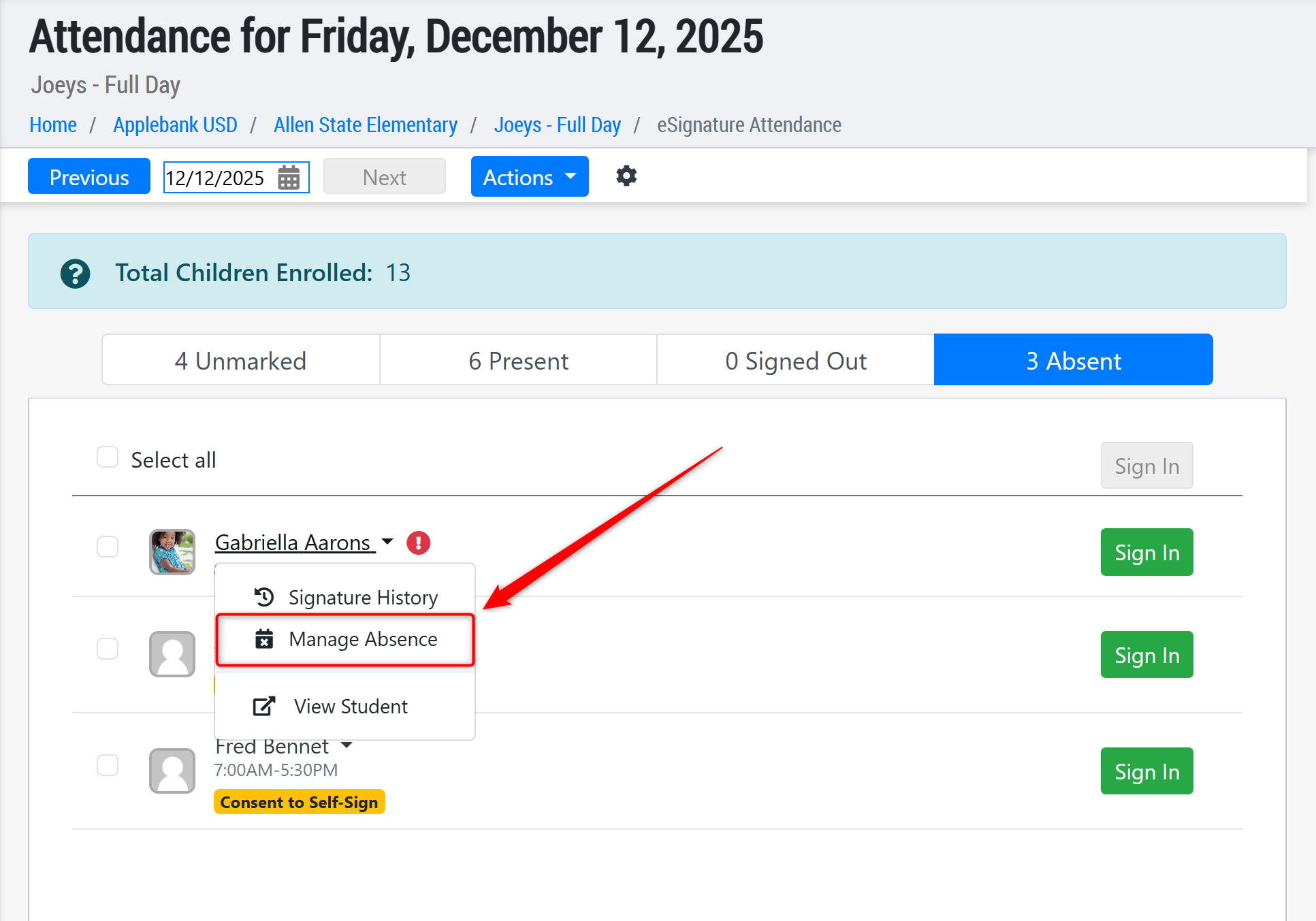
- If a child is listed in the tab Unmarked, Present, or Signed Out, the user will have the drop-down option for any child to "Report Absence" just like before, but now, if the child is in the "Absent" tab then this option will change to "Manage Absence" in which the user can manage and process the child's absence for the day right from this record. Please note that users will only see the "Manage Absence" option if they are assigned a role with permissions to this feature.
General Enhancements
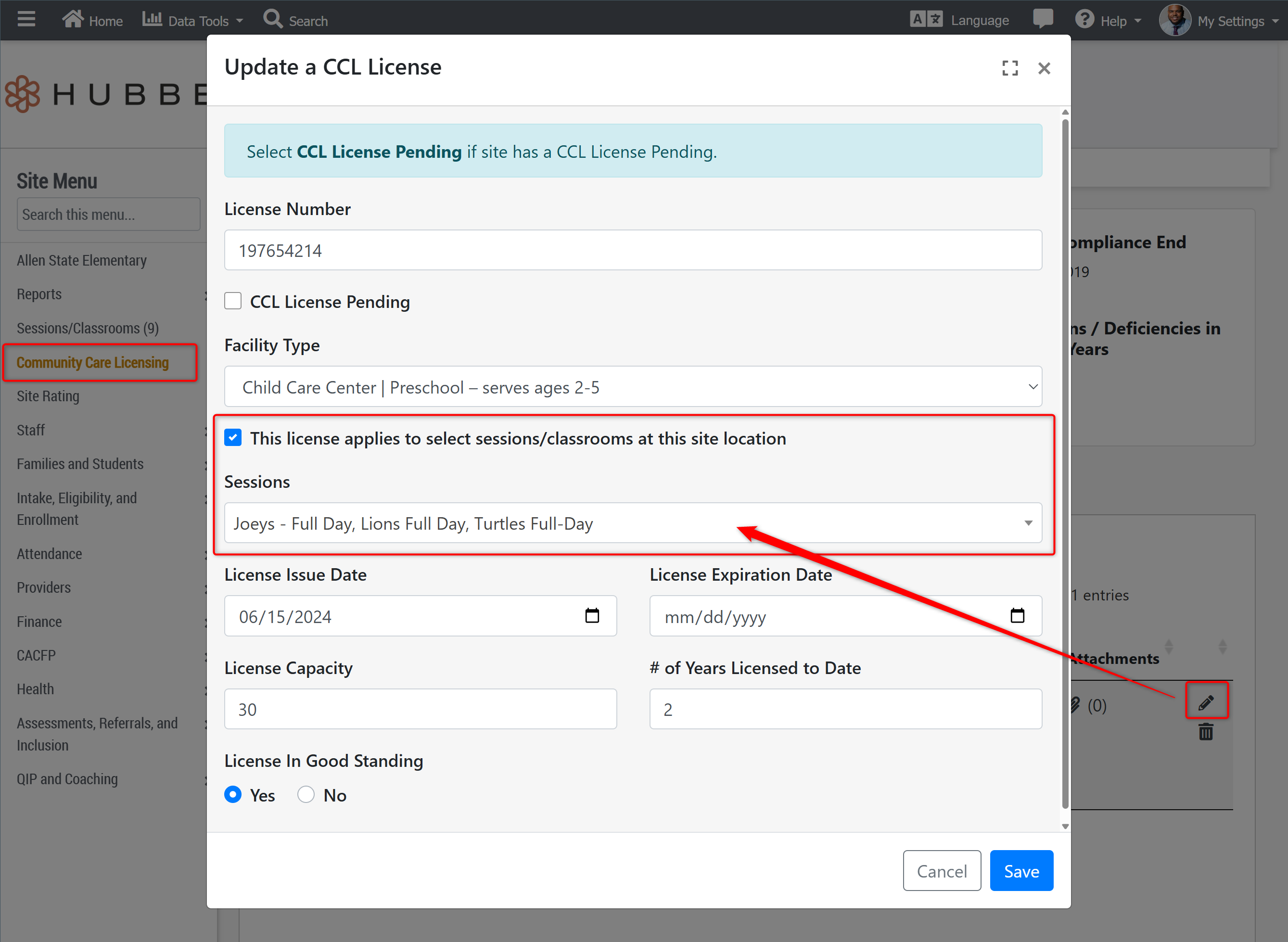
- Updated the site's CCL License feature to allow users to assign a CCL License to selected session(s), rather than all sessions at the site. If this option is not selected, the CCL License will automatically apply to all sessions at the site. The 801A Report has been updated to show the correct CCL License for the child's scheduled session based on this new tool.
- We have added new permissions to the Agency Admin and Education Specialists roles to ensure users assigned either of these roles are able to view, create, edit, delete, and archive a staff member's Professional Growth Goals and Plans.
- Updated the Cost of Care Plus values starting January 2026 per Child Care Bulletin 25-29 (linked here). Provider Invoicing sheets and attendance downloads will include the new rates starting in January 2026.
- Updated the Applications & Waitlist grid to ensure users are able to successfully and efficiently filter for results. As the applications accrue over the years, there is a large amount of data in each tab, and some users reported loading issues when all filters were cleared. As such, users must have at least one filter applied at all times. We also enhanced the way that the "Application Year" filter worked to ensure that summer programs that span across two fiscal years will display for both year filters - for example, a summer program that spans from June 2025 to September 2025 will display when filtering for "2024-2025" application and "2025-2026" applications.
Fixes & Adjustments
- Updated the "Discount" features for Family Billing that users can set up or manage from within a family's Fee Plan. Following user reports of missing or wrong discounts, we have optimized how discounts are updated on the Fee Plan.
- Added an "Active Discounts" toggle view to the Discounts setup area in a family's Fee Plan. Now, users view active discounts by default, but can toggle the "Active Discounts" off to view all past discounts for the family.
- Updated the Family Goal feature to allow users to create goals with a "Created Date" in the past, which users were reporting issues with. A Family Goal can be found by navigating to: Family Menu > Family Engagement > Family Goals.
- Added "Student Name" to the Projected Billing Report, following the "Student ID" that was already there. To navigate to this report and see what any selected billing period will generate: Agency Menu > Finance > Manage Billing > Projected Billing tab.
- We have added a full-page spinner to several areas in our system to prevent users from clicking buttons multiple times in a row and creating duplicate attendance events. This includes the Manual Attendance record's "Mark All Present" and "Mark All Absent" buttons, and the "Save" button when parents/guardians are signing their children in or out each day.
- Fixed an issue with the Parent Survey Results tab at the session level, following user reports that it was not showing completed survey responses.
- Updated the ASQ-3 record to allow users to create and save the record without a score.
- Updated the ASQ:SE-2 record to ensure the score entered by users when creating the record is properly captured as scores 0, 5, or 10 for each question's response.
- Updated the CAPSDAC 1.0 Report to ensure the child's "Date of Enrollment Start" will update to the child's newest CSPP schedule start date if the child has a break in service for 3 months or longer. However, if the child's "Enrollment Start Date" field on their student record is manually entered, this date will be used regardless of the child's scheduling details.
- Fixed an issue with the Spanish version of the CCD-26 Form to ensure the Certification Dates appear when downloaded. This form is available for any Application for Services form for a family in their Subsidized Certification record.
Was this article helpful?
That’s Great!
Thank you for your feedback
Sorry! We couldn't be helpful
Thank you for your feedback
Feedback sent
We appreciate your effort and will try to fix the article